Blog

  • Container Turn-time in a Depot: The Complete Guide

    Container Turn-time in a Depot: The Complete Guide

    Table of Contents


    1. Introduction
    2. What Is Container Turn-time in a Depot?
    3. The Container Turn-time Equation
    4. What Is a Good Container Turn-time?
    5. Where Turn-time Is Lost: The Delay Maps
    6. Self-Audit: How Efficient Is Your Depot?
    7. KPIs That Actually Improve Turn-time
    8. Why Most Depots Struggle With Turn-time
    9. The EMR Quote Bottleneck (Empty Flow)
    10. Excel vs Real-Time Depot System
    11. How Shipzzer Solves Turn-time
    12. Real Depot Transformation Example
    13. The Cost of Poor Turn-time Management
    14. FAQ
    15. Conclusion

    Introduction

    It’s 3 PM on a Tuesday, and your container turn-time in a depot is quietly slipping. Trucks are lined up at your gate. Several empty containers are stuck waiting for inspection. A client just sent a release order for ten full containers—and three are buried at the bottom of a stack. Your phone won’t stop ringing.

    Sound familiar?

    Here’s the thing most guides get wrong: not every container in your depot needs to leave fast. The right strategy depends on whether the container is empty or full.

    Empty containers need fast rotation. The depot earns little from storing them, and long dwell time creates extra inspections, repeated PTI checks, and blocked capacity.

    Full containers are different. The depot may earn storage revenue, so the goal isn’t always to rush them out. Instead, you need controlled dwell time and release readiness—so when the release order arrives, the right containers are accessible and trucks don’t wait.

    When you optimize container turn-time in a depot, you’re really managing two different problems. This guide shows you how to handle both.

    👉 See how depots manage empty rotation and full container release — Book a Demo


    What Is Container Turn-time in a Depot?

    Container turn-time generally means the elapsed time from when a container enters your depot gate until it exits. But its operational meaning changes depending on whether the container is empty or full.

    Simple definition: Container turn-time measures how long a container spends in your depot from gate-in to gate-out. What “good” looks like depends entirely on the container’s status.

    Empty Turn-time vs Full Container Dwell Time

    These are two different concepts that often get blurred together.

    Empty turn-time is about rotation. The faster an empty container moves through gate-in, inspection, repair or cleaning, PTI (for reefers), available status, and gate-out, the better. Empties sitting idle tie up yard space without earning meaningful revenue.

    Full container dwell time is about control, not speed. A full container may generate storage revenue, so keeping it isn’t automatically a problem. The real question is: when the release order comes, can you get it out quickly without expensive rehandles or truck queues?

    So the goal is not “move everything fast.” The goal is: rotate empties quickly, and manage fulls intelligently.


    The Container Turn-time Equation

    For empty containers especially, here’s a useful way to think about turn-time:

    Turn-time = Processing Time + Waiting Time

    Processing time is when work actually happens—inspecting damage, writing quotes, running PTI, moving containers. Waiting time is everything else—an empty sitting while someone hunts for paperwork, or a full container buried because no one planned the stack.

    In most depots, waiting time is the bigger share.

    Why This Matters

    For empties, you can’t speed up an inspection itself. But you can eliminate the hours a container waits because the inspector didn’t know it arrived.

    For fulls, the “waiting” is different. The container isn’t waiting to be processed—it’s waiting to be found and dug out when the release order lands. That waiting shows up as rehandles and trucks idling at your gate.

    The goal isn’t raw speed. It’s flow for empties and readiness for fulls.


    What Is a Good Container Turn-time in a Depot?

    “How fast should turn-time be?” is the wrong question on its own. You need two different KPI views.

    View 1: Empty Container Flow Maturity

    For empties, faster and smoother is genuinely better. A mature empty flow looks like:

    • Empties inspected within hours of arrival, not days
    • Repairs and PTI completed without long idle gaps
    • Containers reach “available” status quickly
    • No empties sitting weeks past their useful window
    • Predictable rotation with minimal blocked capacity

    View 2: Full Container Storage & Release Readiness

    For fulls, “fast” isn’t the target—readiness is. Useful indicators include:

    • Average dwell time by client (so you understand real storage patterns)
    • Release order response time (how fast you can act when a release lands)
    • Rehandles per release (how many moves to dig out the right box)
    • Truck waiting time at pickup
    • Stack accessibility (are high-turnover fulls easy to reach?)
    • Yard occupancy by client, type, and status

    A depot with longer full container dwell time can still be high-performing—if its stacks are organized and releases execute smoothly. Your benchmark isn’t an industry average. It’s whether each container type is doing its job: empties rotating, fulls staying organized and release-ready.


    Where Turn-time Is Lost: The Delay Maps

    Delays hide in different places for empties and fulls. You need two delay maps.

    Empty Container Delay Map

    Empties lose time in the gaps between processing steps:

    • Gate-in to inspection — Container logged on paper, inspector doesn’t know it arrived
    • Inspection to quote — Photos uploaded manually, EMR quote written from scratch in the office
    • Quote to approval — Email sent, client doesn’t respond, follow-up needed
    • Approval to repair/cleaning/PTI — Workshop doesn’t know approval came through
    • Available to gate-out — No clear status, so the container sits even though it’s ready

    Every gap is an empty taking up space without earning.

    Full Container Delay Map

    Fulls lose time differently—not in processing, but in retrieval and release:

    • Poor slotting — Containers placed without thinking about likely release order
    • Buried containers — The box you need is at the bottom of the stack
    • Missing release visibility — No clear view of what’s been released vs still on hold
    • Late preparation — Release order arrives, then preparation starts from zero
    • Excessive rehandles — Multiple moves just to reach one container
    • Truck queues — Drivers waiting at the gate while staff dig out the right box

    Notice the difference. Empty delays come from information not flowing. Full delays come from poor yard organization and weak release planning.


    Self-Audit: How Efficient Is Your Depot?

    Answer honestly. Each “no” points to a gap.

    Empty Rotation:

    • Are empties inspected within hours of arrival?
    • Do EMR quotes go out quickly after inspection?
    • Does PTI for reefers happen without long idle gaps?
    • Do empties reach “available” status without sitting unnoticed?

    Full Container Readiness:

    • Can you see every full container’s location in real-time?
    • Are stacks organized around likely release patterns?
    • When a release order arrives, can you reach containers with minimal rehandles?
    • Do you track average dwell time by client?

    Information Flow:

    • Is container data in one system (not Excel + email + paper)?
    • Can clients get accurate status without a phone call?
    • Do trucks usually avoid long waits at pickup?

    Scoring:

    • 9-11 yes: High-performance depot
    • 5-8 yes: You’re leaving capacity and time on the table
    • Under 5 yes: Major opportunity in both empty flow and full readiness

    👉 Get a personalized depot efficiency review — Book a Demo


    KPIs That Improve Container Turn-time

    One universal turn-time number hides more than it reveals. Track two separate KPI sets.

    A. Empty Container Rotation KPIs

    These measure how smoothly empties move through your depot:

    • Gate-in to first inspection
    • Inspection to quote sent
    • Approval to repair start
    • Repair / cleaning / PTI to available
    • Available to gate-out
    • Empty dwell time

    For empties, lower is generally better across all of these.

    B. Full Container Storage & Release KPIs

    These measure organization and release execution, not raw speed:

    • Average dwell time by client
    • Containers released but not accessible
    • Rehandles per release
    • Truck waiting time at pickup
    • Release order to ready-for-pickup time
    • Yard occupancy by container type, client, and status

    For fulls, the aim isn’t to minimize dwell time. It’s to keep the yard organized and releases fast.

    Why This Split Matters

    When you measure empties and fulls with the same yardstick, you make bad decisions—like pushing out revenue-generating fulls or ignoring empties that are quietly blocking capacity. Separate KPIs give you an accurate picture.


    Why Most Depots Struggle With Turn-time

    You’ve tried improving turn-time before. Here’s why it often stalls.

    Mistake 1: Treating All Containers the Same

    Applying one turn-time target to empties and fulls leads to wrong priorities. Empties need rotation; fulls need readiness. A single KPI can’t manage both.

    Mistake 2: Partial Digitalization

    A gate system here, a repair tracker there, tablets for photos. Each tool helps one step, but containers still wait between steps because information doesn’t flow.

    Mistake 3: No Real Yard Planning for Fulls

    Many depots track empties reasonably well but slot fulls wherever there’s space. Then a release order arrives and the scramble begins—rehandles, queues, frustrated drivers.

    Mistake 4: Manual Decision-Making

    As long as people are the glue holding your process together—checking spreadsheets, chasing approvals, remembering where boxes are—you’ll have delays.

    The pattern: depots struggle not because they work slowly, but because their systems don’t separate empty flow from full readiness.


    The EMR Quote Bottleneck (Empty Flow)

    For empty containers, one of the biggest turn-time killers is the EMR quote process.

    In a typical depot:

    1. Inspector photographs damage (around 20 min)
    2. Returns to office, uploads photos (around 15 min)
    3. Writes damage description (around 30 min)
    4. Looks up repair costs, creates quote (around 45 min)
    5. Formats and emails the quote (around 10 min)

    That’s roughly two hours before the quote even reaches the client. Meanwhile, the empty sits—blocking space, earning little.

    The Smart Depot Approach

    Same inspector, same damage, different workflow:

    1. Inspector photographs damage with a tablet at the container
    2. Photos upload automatically to the container record
    3. EMR quote auto-populates from the damage data
    4. Inspector reviews and adjusts on the tablet
    5. Quote sent on-site, often within 30 minutes of inspection

    The empty never waits hours for a quote to be written. Approval can come back before the inspector finishes the next job—keeping rotation moving.

    This matters most for empties, where idle time is pure waste. It’s one piece of the puzzle, but it’s a meaningful one.

    👉 See how depots send EMR quotes faster — Book a Demo


    Excel vs Real-Time Depot System

    Excel doesn’t just slow you down—it hides what’s happening in your yard. And it hurts empties and fulls in different ways.

    Empty Containers: Hidden Waiting Time

    Scenario: An empty arrives Monday 9 AM.

    In an Excel depot:

    • Gate operator logs arrival in a spreadsheet
    • Inspector checks the sheet at 11 AM, then walks the yard to find it
    • Returns to the office, types damage notes
    • Quote writer checks the sheet at 2 PM, writes and emails the quote
    • Approval and repair handoffs each wait for someone to “check Excel”

    Every “check the spreadsheet” step is an empty sitting idle.

    Full Containers: Blind Stack Planning

    Excel is even weaker for fulls. A spreadsheet tells you a container exists—it doesn’t show you where it sits in the stack or what’s on top of it.

    So when a release order lands:

    • Staff don’t know which containers are accessible
    • High-turnover fulls may be buried under long-dwell ones
    • Crews rehandle multiple boxes to reach one
    • Trucks queue at the gate while this plays out

    The Difference With Real-Time

    A real-time system accelerates empty processing and gives you live yard visibility for fulls—so stacks are organized around release patterns and the right containers are reachable when you need them.

    Excel is a reporting tool pretending to be a workflow tool. Reports tell you what happened. A real-time system tells you what to do next.


    How Shipzzer Solves Container Turn-time

    Shipzzer is a Yard Management System built for small and medium inland container depots. It handles both sides of turn-time—empty rotation and full container readiness.

    For Empty Containers: Faster Rotation

    Shipzzer accelerates the steps where empties lose time:

    • OCR + tablet gate-in — Containers identified and logged instantly, no manual typing
    • On-site inspection — Damage captured on a tablet, photos uploaded in real-time
    • EMR quoting — Quotes generated from damage data and sent without an office round-trip
    • PTI and status tracking — Reefer PTI and repair status updated live, so empties reach “available” without sitting unnoticed
    • Clear gate-out — Available containers are visible and ready to leave

    For Full Containers: Visibility and Release Readiness

    Shipzzer helps you manage fulls without blindly pushing them out:

    • Real-time yard visibility — See every full container’s location and status
    • Smart slotting and stack planning — Organize stacks around likely release patterns to cut rehandles
    • Dwell time tracking — Understand average storage duration by client
    • Release readiness — When a release order arrives, see what’s accessible and prepare early
    • Truck pickup execution — Reduce queues by getting the right containers ready before drivers arrive

    One System, Two Strategies

    The point isn’t to treat every container the same. It’s to give empties fast, clean rotation and give fulls organized storage with quick release—both from one real-time view, with dashboards that keep each KPI set honest.


    Real Depot Transformation Example

    Consider a mid-sized inland depot—handling a mix of empties and fulls, serving regional shipping lines and trucking clients.

    Before: Two Different Problems

    Empties: Inspections lagged days behind arrivals. Quotes took hours. Empties piled up in “waiting” status, quietly blocking capacity.

    Fulls: Containers were slotted wherever there was room. When release orders arrived, crews rehandled stacks to find the right boxes. Trucks queued at the gate. Drivers complained.

    The depot felt maxed out—not because of volume, but because of disorganization.

    The Shift

    Phase 1:

    Tablet gate-in with OCR, so every container was logged and located instantly.

    Phase 2:

    On-site EMR quoting and live status, accelerating empty rotation.

    Phase 3:

    Real-time yard visibility and smarter slotting, so fulls were organized around release patterns and accessible on demand.

    After

    Empties moved through inspection, quoting, and PTI without long idle gaps—freeing up blocked capacity.

    Fulls stayed organized. When release orders came in, the right containers were reachable with fewer rehandles, and trucks spent less time waiting at the gate.

    The depot didn’t just go “faster.” It started treating empties and fulls correctly—and recovered real capacity in the same footprint.

    (Figures vary by depot; treat any improvement numbers as directional, not guaranteed.)


    The Cost of Poor Turn-time Management

    Ignoring turn-time doesn’t fail you suddenly. It costs you quietly, in two different ways.

    For Empties: Wasted Capacity and Extra Work

    Empties sitting too long don’t just block space. They can require repeated inspections and PTI refreshes when they dwell past certain windows. That’s extra labor and cost for containers that earn little in storage.

    For Fulls: Rehandles, Queues, and Poor Service

    Poorly organized fulls create their own costs:

    • Expensive depiling and rehandles to reach buried containers
    • Trucks waiting at pickup, sometimes turning into gate queues
    • Missed or slow release execution that frustrates clients

    Note: the problem isn’t that a full container “stays too long.” It may be paying storage. The problem is poor yard organization when it’s time to release.

    Client Erosion

    Whatever the container type, unpredictable depots lose business. Shipping lines and trucking clients notice which depots execute releases cleanly and rotate empties without fuss—and they route accordingly.

    The real cost isn’t storage. It’s disorganization on both sides of the yard.


    FAQ

    Is turn-time the same for full and empty containers?

    No. For empties, turn-time is a primary KPI—you want fast rotation. For fulls, turn-time is more of a secondary KPI; the focus shifts to controlled dwell time, stack organization, and release readiness.

    Why is empty container turn-time more critical?

    Because the depot usually earns little from empty storage. Long empty dwell time blocks capacity and can trigger repeated inspections or PTI refreshes—extra cost with little return. Fast rotation keeps empties productive.

    Should depots reduce full container dwell time?

    Not blindly. Fulls may generate storage revenue, so keeping them isn’t automatically bad. The real goal is to manage dwell time—understand client storage patterns, organize stacks, and stay ready to release quickly when the order comes.

    What KPIs should depots track for full containers?

    Useful ones include average dwell time by client, rehandles per release, truck waiting time at pickup, release order to ready-for-pickup time, containers released but not accessible, and yard occupancy by type, client, and status.

    How does a YMS reduce rehandles and truck waiting time?

    A Yard Management System gives you real-time visibility of where each container sits, helps you slot fulls around likely release patterns, and lets you prepare containers before trucks arrive. That means fewer moves to reach the right box and shorter queues at the gate.


    Conclusion

    Here’s what to remember:

    Container turn-time means different things for empty and full containers.

    For empties, the goal is fast, clean rotation—because idle empties block capacity and earn little. For fulls, the goal is controlled dwell time and release readiness—because a full container may be paying storage, and the real risk is a messy yard when the release order arrives.

    The depots winning today don’t chase one universal turn-time number. They separate empty rotation KPIs from full storage and release KPIs, and they manage each correctly.

    That takes real-time visibility: knowing where every container sits, rotating empties without delay, and keeping fulls organized and release-ready.

    The question isn’t “can we make every container leave faster?” It’s “are we managing empties and fulls the way each one actually needs?”

    Your next step is simple.

    👉 Book a Demo — See how Shipzzer handles empty rotation and full container release

    We’ll show you:

    • How OCR + tablet workflows speed up empty inspection, EMR, and PTI
    • How real-time yard visibility organizes fulls for fast release
    • How to track the right KPIs for each container type
    • A practical roadmap for your depot

    Schedule a 20-minute call. No pressure, no generic pitch—just a real conversation about your yard.

    Schedule a Call Now →


    Shipzzer is a real-time Yard Management System built for small and medium inland container depots. It helps depot managers rotate empties faster, organize full container stacks for quick release, and replace spreadsheet chaos with full operational clarity.
  • Container Yard KPIs: What to Fix First

    Container Yard KPIs: What to Fix First

    A truck waits 18 minutes at the gate because someone is retyping an 11-character container number from a scratched door. A box sits in the yard for nine days, but storage is charged for six because the arrival timestamp was copied late. A customer disputes a repair because the gate-in photos are stuck on one inspector’s phone. These small failures are exactly why tracking container yard KPIs matters.

    Container yard KPIs are the operational metrics that track gate time, dwell time, inspections, and billing accuracy. They show where time, capacity, and revenue are being lost.

    Most depots already have the data. The problem is that it’s scattered across clipboards, WhatsApp threads, Excel files, and operator memory. By the time it becomes a report, it’s too late to act.

    This guide breaks down the KPIs that matter, where the data comes from, and how to track them without adding more admin work.

    What Are Container Yard KPIs?

    Container yard KPIs are operational measures that show how well a depot moves, stores, inspects, repairs, releases, and bills services.

    They help managers answer practical questions:

    • Are trucks moving through the gate quickly?
    • Are containers sitting too long?
    • How many containers are not available?
    • Can the yard map be trusted?
    • Are repairs moving fast enough?
    • What is the average revenue per customer?
    • Can invoices stand up to customer disputes?

    The best KPI programs do not start with a dashboard. They start with the daily workflow.

    When teams capture timestamps, photos, yard positions, and service records while the work happens, KPI data stays reliable. It becomes a byproduct of operations, not another admin task.

    Why Container Yard Performance Metrics Tracking Fails

    Picture a common Monday morning at an inland depot. A carrier disputes storage charges on a container that left Friday afternoon. The invoice says the unit spent eight chargeable days in the yard. The carrier says it should be five.

    The billing team pulls the spreadsheet. The gate-in time was entered at 10:14, but the gate clerk remembers writing it on a clipboard before lunch because the system was not open at the gate. The gate-out record came from a paper interchange form. The yard supervisor thinks the box was moved twice before release, but only one move made it onto the whiteboard. The customer asks for proof. Now the depot is no longer discussing performance. It is reconstructing a week from fragments.

    This is where KPI tracking breaks down. Not because depot managers do not care about metrics, but because the source data is weak. A clipboard timestamp may be good enough to keep the line moving, yet it is a poor foundation for billing, dwell analysis, and customer disputes. A yard position written down after the move may be close enough until a driver is waiting and the box is not where the system says it is.

    Once the data is scattered, every KPI becomes an investigation. Average dwell time requires gate-in and gate-out dates for every released unit. Gate turnaround requires reliable arrival and exit timestamps. Billing accuracy requires matching service records, photos, storage days, and invoice lines. When each number takes 30 minutes of spreadsheet work, managers stop asking for the number unless there is already a problem.

    The answer is not to tell teams to track harder. The answer is to capture cleaner operational data at the moment the work happens.

    Where Container Yard KPIs Data Comes From

    Good Container Yard KPIs are built from ordinary depot events. A truck arrives. A container is photographed. A number is read. An inspection is completed and an EDI is sent. A box is placed in a slot. A repair estimate is sent (EDI). A unit is released. Each of those events can produce a timestamp, a status, a location, and a record that another team can trust.

    At the gate, OCR can read the container number from a tablet photo, record the arrival time, link the truck and booking details, and start the inspection record without retyping. That one event feeds gate turnaround, dwell time, billing, and customer visibility.

    During inspection, a tablet-based workflow can prompt the inspector to capture each side of the container, record damage type and location, and connect the photos to the unit file. That makes inspection completion, damage detection, EMR response time, and later billing evidence much easier to see.

    In the yard, a mobile position update can show that a container moved from Bay 12 to Bay 15, not after the shift, but while the move is being completed. The yard map becomes a working picture of the depot instead of a hopeful approximation.

    The pattern matters. A depot should not have to stop operating in order to measure itself. The strongest KPI data comes from gate-in, inspection, yard move, repair, release, and billing workflows that create records as part of the job.

    The 10 Container Yard KPIs That Matter

    The following KPIs are not a universal scorecard. Depot layout, volume, customer mix, stacking rules, labor model, equipment, and transport flows all change what good looks like. The targets below are practical starting points based on typical inland depot operations and on depots that tend to perform well, not fixed industry laws.

    1. Gate Turnaround Time

    Gate turnaround time measures the minutes between truck arrival and gate exit, both for inbound and outbound moves. It is one of the most visible KPIs in the yard because everyone can see the queue. Drivers see it. Customers hear about it. Managers feel it before they see the report.

    Based on typical inland depot operations, many well-run small and medium depots try to keep gate-in under 10 minutes and gate-out under 5 minutes. The exact number depends on inspection requirements and traffic pattern, but the direction is clear: long gate times usually mean the team is doing too much manual work at the most congested point in the operation.

    The delay builds through small handoffs: the container number is retyped, the booking is checked in another system, the interchange form is still pending, and a supervisor is pulled in to validate an exception. None of these steps is unreasonable on its own, but together they turn the gate into a bottleneck.

    A tablet-first gate workflow changes the source of the delay. OCR reads the container number from a photo, the system logs the timestamp, and inspection evidence is captured on the same device. Shipzzer, for example, uses this kind of gate workflow so turnaround time is visible by day, shift, or operator without a separate report. The point is not the dashboard itself. The point is that the queue stops depending on retyped data.

    2. Container Dwell Time

    Container dwell time measures how long a container stays in the yard before collection or release.

    It is:

    • A space KPI
    • A customer communication KPI
    • A billing KPI

    For many small to medium inland depots, an average dwell time of 3 to 5 days is a reasonable baseline for loaded containers. Empty containers typically have a longer turnaround time.

    Containers sitting beyond seven days often need attention. Not because seven is a strict rule, but because long dwell usually signals:

    • Customer delays
    • Documentation issues
    • Repair holds
    • Release problems
    • Poor communication

    The financial risk is simple.

    If arrival dates are not captured reliably, storage billing becomes fragile.

    The depot may:

    • Undercharge by missing billable days
    • Overcharge and trigger disputes

    Dwell time is where operational sloppiness quietly becomes revenue leakage.

    How to calculate dwell time

    Dwell time = Gate-out date − Gate-in date

    The formula is simple. The challenge is trusting both timestamps.

    When gate-in and gate-out events are captured directly during operations, managers gain real visibility:

    • Average dwell for released containers
    • Containers exceeding thresholds
    • Three-month dwell trends
    • Dwell time by customer

    That last view is often the most valuable.

    If one customer averages nine days while others average four, the issue may not be yard capacity. It may be a workflow or communication gap that needs fixing.

    3. Yard Occupancy Rate

    Yard occupancy rate measures how much of your usable yard capacity is currently in use based on actual stacking rules/bays height.

    For small and medium depots, this is not about theoretical capacity. It is about what the yard can actually handle in daily operations.

    A depot may look like it can store 1500 containers on paper. In reality, usable capacity is lower once you account for:

    • Access lanes for trucks and equipment
    • Repair and inspection zones
    • Customers/Shipowners specific areas
    • Empty container stacks
    • Reefer/PTI points
    • Hazardous cargo segregation
    • Staging areas for pickups and releases
    • Customer-specific stacking rules

    This is why practical capacity matters more than theoretical numbers.

    What is a healthy occupancy level?

    Depots that run smoothly often operate within a 40% to 50% occupancy range.

    This leaves enough space for:

    • Late arrivals
    • Staged releases
    • Priority moves
    • Unexpected exceptions

    Below that range, space may be underused.

    Above 65%, problems usually start to appear:

    • Slower container retrieval
    • More rehandles/Parasitic or Extra moves
    • Congestion in key zones
    • Less flexibility when trucks arrive out of sequence

    How to calculate yard occupancy

    Occupancy (%) = (Containers in yard ÷ Practical capacity) × 100

    The formula is simple.

    The real value comes from seeing this number live, not at the end of the month.

    What occupancy really tells you

    When tracked in real time, occupancy becomes a decision tool.

    It helps managers see:

    • Whether the yard is truly full or just poorly organized
    • Which zones are under pressure
    • Where planning or stacking rules are creating bottlenecks

    For example, a depot running at 65% occupancy may not be evenly full.

    Two blocks may be congested because export empties are still stacked under outdated rules, while another area sits half-used after a change in customer pickup patterns.

    Why real-time visibility matters

    Occupancy becomes actionable only when yard positions are reliable.

    When every container move updates the yard map in real time, managers can:

    • Spot congestion before it slows operations
    • Rebalance space across zones
    • Separate real capacity issues from planning problems

    Without that visibility, occupancy remains just a number.

    With it, it becomes a way to control flow, not just measure it.

    4. Container Positioning Accuracy

    Positioning accuracy measures how often the system location matches the container’s actual position in the yard.

    It is the trust KPI.

    When accuracy is high, operators drive directly to the slot.
    When it is low, the yard becomes a search operation.


    What is a good positioning accuracy?

    Depots with strong yard control often aim for above 95% accuracy.

    That may sound ambitious. But the last few percentage points are where the most expensive errors happen.

    When a container is not where the system says it is, the impact spreads quickly:

    • Slower gate turnaround
    • Lower equipment productivity
    • More internal calls
    • Potential errors at Gate-out
    • Driver frustration

    Why positioning errors happen

    Most errors are not complex.

    They usually follow a simple pattern:

    • A container is moved quickly
    • The operator plans to update later
    • The update is delayed or missed
    • Another move happens before the system is corrected

    By the time the office checks, yesterday’s map is pretending to be today’s reality.


    What it looks like in practice

    A truck arrives for a container marked as ready in Bay 4.

    The operator drives there and finds a different unit in the slot.

    Now the search begins.

    After 10–15 minutes of calls and guesswork, someone remembers the container was moved during a disruption the day before.


    How to calculate positioning accuracy (optional KPI)

    Accuracy (%) = (Correct positions ÷ Total positions checked) × 100

    The formula is simple.

    The challenge is keeping the data correct in real time.


    Why real-time updates change everything

    A live mobile workflow closes the gap between movement and data.

    When the operator confirms the new position at the moment of movement:

    • The yard map/inventory updates instantly
    • The gate sees the correct location
    • The office works with reliable data
    • Billing and customer service stay aligned

    The best positioning KPI is not a monthly audit score.

    It is the absence of people asking:

    5. Yard Move Efficiency and Rehandle Rate

    Yard move efficiency compares productive moves with parasitic moves.

    Productive moves support the job, such as:

    • Gate-in placement
    • Gate-out retrieval
    • Planned repositioning
    • Inspection movement
    • EMR/Repair flow

    Parasitic moves are the moves nobody wanted.

    They happen when teams must shift containers because a target unit is blocked, a location is wrong, or a box was placed without considering its departure timing.

    The word parasitic is useful because these moves feed on the operation. They consume equipment hours, fuel, labor, and attention without adding value.

    For many small and medium depots, keeping parasitic moves below 20% can be a useful internal target. Once they climb higher, the yard starts spending a visible part of the shift undoing yesterday’s placement decisions.

    Parasitic moves usually come from predictable causes:

    • Long-dwell containers blocking short-dwell units
    • Containers not grouped by customer, size, status, or expected departure
    • System locations that operators cannot trust
    • Stacking rules that live in a supervisor’s head, not in the workflow

    A late-afternoon release can expose the problem quickly.

    The target container is due at the gate in 20 minutes. But three long-dwell units are sitting in front of it.

    One planned retrieval becomes four moves and a delayed driver.

    Reducing parasitic movement is not about telling operators to be more careful.

    They need visibility before they place the box.

    A yard system that shows dwell status, customer grouping, release expectations, and available slots helps the team avoid creating tomorrow’s rehandle while solving today’s move.

    6. Inspection Completion Rate

    Inspection completion rate measures whether required inspections actually happen.

    These may include:

    • Gate-in inspections
    • Pre-delivery checks
    • PTI
    • Repair-related inspections
    • Customer-specific checks

    For gate-in inspections that require evidence, the only credible target is 100% completion.

    One missed unit can become the container everyone argues about later.

    Missed inspections create expensive ambiguity.

    A customer may claim damage happened while the container was in the depot. The depot may believe the box arrived damaged.

    Without timestamped gate-in photos, both sides are arguing from memory. That is a weak position, especially when the repair cost is higher than the time needed to document the unit properly.

    Picture a driver arriving just before lunch with three empties and a line forming behind him.

    The team inspects the first two units, then lets the third through without photos to clear the gate.

    That shortcut can become expensive later.

    Supervisors, billing, and customer service may all spend time reconstructing what should have been captured in 90 seconds.

    The key question is simple:

    Can the workflow allow an inspection to be skipped?

    If the gate can advance without photos, skipped inspections will eventually happen under pressure.

    If photos are mandatory and attached to the gate-in record, evidence becomes part of the movement.

    It is no longer an optional admin step.

    7. Damage Detection Accuracy

    Damage detection accuracy measures how much visible container damage is identified during the initial inspection, rather than discovered later.

    It is not a perfect KPI.

    Some damage is hidden. Some defects only appear during handling, cleaning or repair.

    But for visible external damage, many depots aim for above 85% detection as an internal benchmark.

    When damage is discovered late, the conversation shifts from repair planning to blame.


    Why this KPI depends on behavior

    Damage detection accuracy is closely tied to how inspections are performed.

    A rushed visual check at the gate will miss more than a structured, photo-based process.

    When inspectors are prompted to:

    • Capture all sides of the container
    • Mark damage locations
    • Follow a consistent sequence

    They naturally slow down and observe more carefully.

    The camera does not replace judgment.

    It slows the process just enough to create reliable evidence.


    What happens when damage is missed

    A corner post dent missed at gate-in may only surface two days later when the container is staged for collection.

    By then:

    • The customer wants to know when the damage occurred
    • The yard team wants to know who handled it
    • The depot has less proof to support its position

    What should have been a simple record becomes a dispute.


    Why early evidence matters

    The value of this KPI appears later in the workflow.

    Timestamped photos support:

    • EMR quotation
    • Customer communication
    • Billing accuracy

    In a depot, evidence has a half-life.

    Capture it at gate-in, or expect it to decay into opinion.

    8. EMR Quote Response Time

    EMR quote response time measures the number of hours between the damage inspection — or a failed PTI for reefers — and the moment the repair estimate is sent to the customer.

    This KPI matters because repair work is both operational and commercial.

    Shipping lines and container owners want:

    • Speed
    • Clarity
    • Cost control

    A depot that takes two days to send a quote can lose work to a competitor that responds in four hours, even if its repair pricing is fair.

    With manual workflows, 24 to 48 hours is still common in many depots.

    The delay usually comes from moving information between:

    • Inspection notes
    • Damage photos
    • Parts pricing
    • Estimate templates
    • Approval channels
    • Customer communication

    Every handoff adds a place for the quote to sit.

    A stronger workflow connects the inspection directly to the estimate.

    Damage photos, repair locations, repair codes, parts pricing, and labor lines should not need to be rebuilt after the inspector leaves the container.

    In Shipzzer’s EMR workflow, inspection data flows directly into quote creation and delivery, so teams can send estimates without re-entering information.

    But the bigger principle is simple:

    The quote clock should start and stop inside one traceable process.

    The dashboard should show:

    • Average quote response time
    • Longest pending quotes
    • Quotes stuck by status

    Averages are useful. But the oldest unresolved estimate is often where the customer pain is sitting.

    9. Billing Accuracy Rate

    Billing accuracy rate measures the percentage of invoices issued without error, correction, or dispute. It is one of the clearest financial KPIs in a container depot because bad billing does not only delay payment. It burns staff time and weakens customer confidence.

    Many depots target billing accuracy above 95 percent, but the better question is what makes the remaining 5 percent fail. Manual container number entry creates typos. Disconnected systems leave gate data in one place and invoice work in another. Missing service documentation makes repair charges hard to defend. Weak timestamps create storage arguments.

    Billing improves when invoice lines are supported by operational records. Gate-in and gate-out timestamps support storage days. Inspection photos support damage and repair claims. EMR records support estimate and approval history. Yard and service events support special handling charges. Shipzzer connects these records so invoices can be built from depot activity rather than recreated after the fact.

    The customer portal side matters too. When customers can see status, service history, photos, and invoice details without emailing the depot, disputes often become shorter and less 

    10. EDI Accuracy Rate

    What it measures:

    Percentage of EDI messages transmitted without errors — across container movements, repair quotes, and status updates sent to shipping lines, clients, and billing or accounting systems

    Why it matters:

    An EDI error isn’t just a technical glitch. It’s a billing delay, a disputed quote, and sometimes a container that has already left your yard while your depot is still waiting to get paid.

    Benchmark target:

    Target as close to 100% as possible — every rejected message is a delayed invoice

    Calculation: (EDI messages accepted without error ÷ Total EDI messages sent) × 100

    Where errors come from:

    • Manual data entry before transmission (wrong container number, wrong ISO code)
    • Outdated client contract parameters applied to quotes
    • Missing or incorrect CEDEX damage codes
    • Wrong EDI format for a given shipping line (EDIFACT vs. ANSI X12)
    • Disconnected systems where data is re-entered instead of flowing automatically

    The cash flow impact:

    A rejected EMR quote delays the entire invoicing cycle. Your team corrects the file, resubmits, and waits for revalidation. That can take several days. Meanwhile, the repair is complete, the container is gone, and the invoice is stuck.

    The depot did the work. But without a clean EDI chain, you don’t get paid.

    How integrated EDI transmission eliminates errors:

    With Shipzzer, EDI messages are generated automatically from data captured on the tablet — not typed manually by a back-office team:

    • Container number read via OCR → flows directly into EDI message (no retyping, no double entry)
    • Damage codes selected on the tablet via the repair interface → standardized CEDEX codes applied automatically
    • Client-specific pricing rules applied at quote generation → no manual adjustments needed
    • EDI format configured during onboarding per shipping line (EDIFACT, ANSI X12, API, FTP, SFTP, email) → correct format applied from day one

    No file transfers. No manual reformatting. The EDI message is a byproduct of the operational workflow — not a separate manual step.

    Automatic tracking: System logs every EDI message sent, delivery status (accepted / rejected / pending), and error type when applicable. Live dashboard shows overall accuracy rate, messages pending revalidation, most frequent error types, and delays in EDI acceptance — no manual tracking, full traceability.

    Actionable insight: Break down EDI accuracy by message type (movements vs. quotes vs. repairs). When rejection rates are higher on quotes, the root cause is often linked to pricing configuration or CEDEX codes — a good starting point for a targeted fix.

    How to Read a Container Yard KPIs Dashboard

    A dashboard is only useful if it changes what happens next.

    The mistake is to stare at averages and call that management.

    Averages are a starting point. Exceptions are where the work is.

    1. Start with outliers

    An average gate time of eight minutes may look healthy.

    But if 15% of gate-ins take more than 15 minutes, that tail is where drivers are losing patience.

    Find the long waits and ask what they have in common:

    • Shift
    • Customer
    • Container type
    • Paperwork issue
    • Inspection requirement
    • Equipment availability
    • System delay

    2. Look for the bottleneck

    If turnaround is slow only in the morning, the issue may be staffing, shift handover, or inbound appointment clustering.

    If it is slow all day, the problem is probably structural:

    • Manual data entry
    • Disconnected systems
    • Unclear exception handling
    • A gate process that asks one person to do too much

    3. Compare customers

    Customer comparison is often revealing.

    One customer may average nine days of dwell while another averages four.

    One may generate status requests every day while another barely calls.

    That does not automatically mean one customer is difficult.

    It may mean:

    • Release documents arrive late
    • Collection patterns are uneven
    • The customer lacks visibility into depot status

    4. Compare yard zones

    Yard-zone comparison is just as practical.

    If one zone has 95% positioning accuracy and another has 85%, investigate the difference.

    The cause may be:

    • Signage
    • Lighting
    • Operator habits
    • Stacking pressure
    • Cargo type assigned to that zone

    A KPI should lead a manager back to the ground, not away from it.

    5. Turn the number into action

    “Gate turnaround is 12 minutes” is a complaint.

    “Gate turnaround is 12 minutes because we manually type container numbers at peak arrival; this week we test OCR for inbound trucks” is an operational decision.

    That is the point of a KPI dashboard: not more reporting, but better action.

    Which Container Yard KPIs Should You Track First?

    Trying to monitor every KPI at once usually creates a reporting project that nobody wants to maintain. Start with the problem that is already costing the depot time, money, or customer trust. Then choose three KPIs that expose that problem from different angles.

    Start with gate congestion when trucks are backing up or drivers are waiting too long.

    Track:

    • Gate turnaround time
    • Inspection completion rate
    • Container positioning accuracy

    Gate congestion is rarely only a gate problem. A slow inspection can hold the truck. An incorrect container position can delay release. Manual lookups can turn a normal arrival into a queue.

    When yard space is the pressure point, focus on the KPIs that explain why the depot feels full.

    Track:

    • Yard occupancy rate
    • Container dwell time
    • Yard move efficiency

    These KPIs show whether the depot is truly short on space or whether capacity is being lost through long dwell times, poor stacking decisions, and unnecessary rehandles.

    For repair flow problems, start where inspection, estimation, and approval delays usually appear.

    Track:

    • EMR quote response time
    • Damage detection accuracy
    • Inspection completion rate

    Repair revenue depends on catching damage early, documenting it clearly, and sending estimates fast enough for customers to approve the work.

    Billing disputes require KPIs that connect invoices back to operational proof.

    Track:

    • Billing accuracy rate
    • Customer status requests
    • Container dwell time

    Most billing disputes trace back to weak operational records: missing timestamps, manual entry errors, unclear service evidence, or customers who cannot see the history behind a charge.

    When the office keeps answering the same customer questions, the issue is usually visibility or trust.

    Track:

    • Customer status requests
    • Container positioning accuracy
    • Inspection completion rate

    Customers call when they cannot see the status, when they do not trust the status, or when the depot cannot give a clear answer quickly.

    FAQ: Container Yard KPIs

    What are the most important Container Yard Performance Metrics?

    For many small to medium inland depots, the first three to watch are gate turnaround time, container dwell time, and billing accuracy rate. Together they cover daily flow, yard capacity, and revenue protection. If those three are weak, the depot usually feels it quickly in queues, congestion, and customer disputes.

    How do you track container yard KPIs without adding admin work?

    The cleanest method is to capture KPI data during the normal movement of work. Gate OCR records numbers and timestamps. Tablet inspections attach photos and damage notes to the container file. Mobile yard updates keep positions current. The reporting comes from those events rather than from someone rebuilding the day in Excel.

    What is a good container dwell time for a small depot?

    A 3 to 5 day average is a common internal benchmark for small and medium inland depot operations (loaded containers), especially where free-time terms are short. Containers beyond seven days should usually be reviewed by customer, status, and release condition because the cause may be documentation, communication, or collection timing rather than yard performance alone.

    How can I improve my depot’s gate turnaround time?

    Manual container number entry is often the fastest delay to remove. OCR-based gate workflows on tablets reduce typing, cut errors, and create reliable timestamps. Digital inspections, prefilled booking details, and digital interchange forms can then remove the next layers of waiting.

    Why is billing accuracy important for container depot operations?

    Billing accuracy protects cash flow and credibility. A disputed invoice can take longer to resolve than the original service took to perform. Depots that connect invoices to gate timestamps, inspection photos, EMR records, and storage calculations are in a stronger position because the charge is backed by an operational record.

    How does yard management software help with container yard KPIs?

    Think about the 10:30 rush, when three trucks are waiting, one customer is chasing a release, and the yard supervisor says the box is not where the system shows it. A good yard management system lets the manager see the live gate queue, the last confirmed position, the inspection status, and the dwell clock in one place, then decide whether the problem is the gate, the yard, or the customer release process. Without that view, the same manager is calling the gate, radioing the operator, checking a spreadsheet, and hoping the answer arrives before the queue gets worse.

    Conclusion: Fix the First Leak

    The best container yard KPIs programs do not begin with a perfect dashboard. They begin with one leak the team can see and fix: a slow gate, unreliable dwell data, parasitic yard moves, missing inspection evidence, delayed EMR quotes, or billing records that cannot survive a customer challenge.

    Once the workflow captures the right data at the right moment, the KPI stops being a report and becomes part of how the depot runs.

    If you had to defend one number from your depot tomorrow morning, which one would you trust without asking anyone to rebuild it?

  • Best Yard Management Software in 2026: Top 6 Tools for Container Depots

    Best Yard Management Software in 2026: Top 6 Tools for Container Depots

    Is this article for you?  Running a container depot (gate moves, yard management, repair estimates)? → Keep reading.   Running a port terminal, warehouse, or transport company? → This is not your list.

    Table of Contents

    1. What is container yard management software for container depots?
    2. How we selected these tools — and what we excluded
    3. Top 6 best yard management software tools in 2026
    4. Quick comparison table
    5. How to choose the best container yard management software for your depot
    6. Yard management software vs terminal operating system (TOS)
    7. FAQ
    8. Final verdict

    Quick answer:

    The best yard management software for container depots in 2026 includes Shipzzer, ContPark, Containerchain, iDepo, Kaleris, and LogStar.

    Ultimately, the right choice depends on depot size, and furthermore, whether the system supports tablet-based container inspections, native repair estimates and EDI workflows, and direct connection to shipping lines — all without requiring enterprise infrastructure.

    Yard management software (YMS) for container depots is an operational system that manages and tracks container movements in the depot yard in real time — covering gate moves, damage surveys, repair estimates, yard inventory, and reporting. The tools in this list focus on inland container depot workflows, not generic warehouse systems or large port terminal operating systems.

    Without one, the numbers are painful. Manual check-in processes take 10 minutes or more per truck. A survey from Supply Chain 24/7 found that 41% of logistics managers cite manual processes as their top operational pain point. Spread that across a busy depot day and you are looking at hours lost, EDI validations delayed, unnecessary crane moves, and containers going untracked.

    Many depots still operate with clipboards and manual logs. Indeed, while these repetitive routines feel “mastered,” they create a dangerous illusion of control. In reality, however, this model cannot scale.

    The Limits of Manual Management:

    • The Scalability Trap: You cannot handle higher volumes or demanding new clients with tools that don’t talk to each other.
    • Operational Blindness: Repeating manual gestures feels reassuring, but it lacks the real-time data needed to optimize a yard.
    • The Workflow Gap: Modern logistics require complex, automated workflows. Meeting these demands with a pen is no longer just difficult—it is impossible.

    True mastery isn’t about repeating old habits; it’s about digital agility. A YMS turns your depot from a manual site into a scalable powerhouse.

    Growth begins where the paper ends.

    A complete yard management software solution for container depots covers gate in/out, container inspections, automated EMR quotes, real-time yard inventory, and client portals — from a single operational system used by your yard team directly on tablet.

    To understand the fundamentals first, read our guide on what a yard management system actually does.

    We evaluated software that covers container depot workflows effectively — and, regardless of whether a platform also serves terminals, yards, or broader logistics operations, we focused on depot-specific fit.

    What mattered was how well each tool handles the core depot workflow: gate moves, container inspections, EMR repair estimates, EDI to shipping lines, yard inventory, and billing.

    Ranking logic:

    We prioritised depth of depot-specific workflows above all else. Consequently, tools with weaker coverage of container surveys, repair estimates, or gate moves were ranked lower, regardless of overall feature count or platform breadth.

    Each tool was evaluated on 10 criterias :

    • Gate in / Gate out — built for depot workflows or adapted from something else?
    • True Multimodal Integration — does the system treat road, rail, and barge flows with equal depth? After all, a top-tier YMS must handle complex intermodal handovers, ensuring that container data remains consistent whether it arrives on a chassis, a rail wagon, or a river barge. 
    • Next-Gen Innovation (Native OCR & VBS) : Is the tech built-in or bolted-on? We look for native Optical Character Recognition (OCR) for instant container identification and integrated Vehicle Booking Systems (VBS) to eliminate gate congestion. True innovation means reducing manual entry to zero 
    • Yard Management (stacking rules, yard live view, inventory live view) 
    • EMR and M&R repair workflow — native estimates, client approval, and audit trail?
    • Container inspection and damage tracking — real survey process support?
    • EDI integration — connects to the major shipping lines your depot works with?
    • Depot size fit — realistic for small and medium operations, or enterprise-only?
    • Tablet and mobile access — field use without heavy hardware?
    • Intuitive UX/UI (Desktop & Mobile) : On Desktop: Office staff get a powerful, “at-a-glance” dashboard to manage billing and planning without digging through endless menus. On Mobile: The app is designed for “one-handed” operation in the field. Large touch targets, high-contrast displays for outdoor visibility, and a logical flow mean your team spends less time looking at screens and more time moving containers.

    What we excluded:

    Port terminal operating systems (Navis, Tideworks), generic warehouse tools, and freight platforms with no meaningful role in container depot operations.

    Editorial note: Feature availability was checked on public product pages in April 2026. Some vendors offer modular or custom deployments — features listed reflect public documentation only. Custom deployments may differ.

    #1 Shipzzer — Best depot-native tool for small and medium container depots

    Is this you?  You manage one or more container depots. Your team works on the yard floor. You need gate moves, yard management, fast inspection, damage surveys, EMR quotes, and client approvals — without a 6-month IT project and no fixed camera hardware.

    Not for you if…  You run a large port terminal or a CFS operation focused primarily on bulk cargo consolidation — Shipzzer is built for the empty and loaded container depot workflow, not Terminal forklift handling or enterprise-scale supply chain execution platforms..

    Shipzzer is built from the ground up for container depot yard management — not adapted from a warehouse tool or a port TOS. Every feature maps to real depot workflows: gate moves, container inspections via tablet, automated EMR repair quotes, and live dashboards visible to both your team and your clients.

    The standout in 2026 is the combination of OCR container recognition from a standard tablet (container MAEU 123456 5 is read automatically at entry — no fixed cameras, no manual typing) and automated EMR quote generation. The EMR quotation feature runs the full workflow — damage detection, photo via tablet, EMR quote, EDI-compliant validation and approval — without phone calls or email chasing.

    It also reduces unnecessary crane moves and improves container turn-time by keeping the yard inventory accurate in real time.

    For teams managing multiple sites, Shipzzer also works as a mobile yard management app — tablet-first, deployable in a few weeks without a dedicated IT team, no heavy camera infrastructure or complex IT setup required.

    It also supports multimodal depot operations, tracking container flows across road, rail, and inland waterway from a single dashboard.

    Key features (verified):

    • Gate in / gate out with tablet-based OCR — container number recognised at entry
    • Automated EMR repair quotes sent directly to shipping lines for approval
    • EDI-compliant for the world’s top 10 shipping companies (codeco, westim, coparn etc.)
    • Vehicle Booking System (VBS) — truck slots pre-booked, queues eliminated
    • Multi-depot live dashboard — one view across all your sites
    • Real-time operations dashboard for yard, repairs, and inventory
    • Spare parts manager with auto-reorder based on usage patterns
    • 24/7 client portal — inventory, bookings, service history
    • Multimodal support — road, rail, inland waterway tracked in one system
    • Intelligent bay manager — custom stacking rules to minimise crane moves and reduce turn-time
    • Integrated billing and invoicing — automated charges per container event
    • Complete audit trail + unlimited historical data (5+ years)

    Strengths:

    The only tool on this list built tablet-first with no heavy camera infrastructure required. OCR, EMR, and EDI validation workflows in one uninterrupted flow. Deployable in a few weeks without a dedicated IT team. Intelligent stacking rules keep crane moves to a minimum and container turn-time optimised.

    Honest limitation:

    Shipzzer is built specifically for container depots. If you operate a mixed facility with bulk cargo, large-scale CFS, or complex port terminal operations, you may need a broader platform.

    👉 Book a demo with Shipzzer — see the full tablet-to-quote workflow live.

    #2 ContPark — Cloud-based depot and terminal platform with strong yard planning

    Is this you?  You manage a mid-to-large inland depot or ICD and need a proven cloud platform with strong gate, 2D/3D yard visualisation, and EDI capabilities.

    Not for you if…  You need a single integrated system with billing and OCR included out of the box — ContPark’s modular structure means several capabilities are available as separate named modules rather than in one base package.

    ContPark is a cloud-based container depot and terminal management system covering gate operations, container inventory, yard planning, M&R workflows, billing, and EDI reporting. It serves inland depots, container freight stations (CFS), and intermodal hubs. The platform includes a 2D/3D yard map, mobile access across devices, and a client portal where customers can accept or refuse repair work.

    Key features (verified from contpark.com):

    • Gate in / Gate out with driver and truck registry
    • 2D/3D interactive yard map with real-time container positioning
    • M&R repair module with defect list, photos, and client approval
    • EDI integration including CODECO with major shipping lines
    • Contpark.Billing module — billing and invoicing (available as a named module)
    • Reporting dashboard and KPI analytics
    • Mobile-friendly across all devices

    Strengths: Solid cloud architecture, strong yard visualisation tools, broad EDI coverage. Modular structure — you configure what you need.

    Pricing: No public pricing. Custom quote model. Contpark.Billing is a named separate module — billing appears to be modular rather than included in the base CDMS, though exact inclusions vary by deployment.

    Honest limitation: ContPark’s OCR (VisionAI) is a separate module within their CTMS suite, using IP cameras for real-time scanning — not a tablet-native solution. ContPark also serves terminals, railway yards, and general cargo — not exclusively container depots.

    #3 Containerchain — Strong on truck flow, VBS, and EDI for busy depots

    Is this you?  Your depot handles high daily truck volumes and gate congestion is your biggest pain. You need a proven VBS and automated truck scheduling as the core of your operation.

    Not for you if…  Your primary challenge is EMR quote automation or tablet-based container inspections — Containerchain’s core strength is truck flow, not the inspection-to-repair-quote workflow.

    Containerchain’s Depot solution (now owned by WiseTech Global) is a cloud-based ERP and communication platform covering yard operations, M&R processes, truck arrivals, and traffic management. Its eGate product automates truck arrivals in real time via a smartphone or tablet app. The Notifications product manages pre-arrival validation, queuing, and gate capacity. EDI to shipping lines and leasing companies is automated.

    Key features (verified from containerchain.com):

    • Full M&R capability with paperless process and electronic estimates
    • Automated EDI to shipping lines and leasing companies
    • eGate smartphone/tablet app for automated truck arrival processing
    • VBS with dynamic gate and yard capacity optimisation
    • Real-time container inventory across the depot
    • Business intelligence and financial reporting

    Strengths:

    One of the strongest VBS and truck flow management systems available. Automated EDI is well integrated. Part of WiseTech Global, with strong presence in Australia, New Zealand, Singapore, Europe, and the US.

    Pricing:

    No public pricing found. SaaS model. Exact pricing terms including whether Notifications is charged per transaction were not confirmed from a current official pricing page.

    Honest limitation:

    eGate connects container facilities with truck drivers and other parties in the logistics chain — it is not a depot operator inspection tool. The CDMS platform comes pre-populated on cabin forklift devices and dedicated handheld survey devices — not standard tablets. This means deploying Containerchain requires setting up and managing a dedicated hardware fleet, unlike Shipzzer which runs on any standard tablet already on the yard. Best suited for operations where gate throughput and truck appointment scheduling are the primary pain point.

    #4 iDepo (iInterchange / MRI Software) — Purpose-built web system for dry container depots

    Is this you?  You run a dry container depot and want a web-based system covering the full operational cycle — gate moves, surveys, repairs, washing, billing — without features you will not use.

    Not for you if:

    • You need native tablet OCR for container recognition at gate or in the yard — iDepo’s public product pages emphasise tab-based inspections and check-digit assistance but do not prominently list a native OCR container-recognition module.
    • You expect a fully integrated EMR workflow — iDepo’s M&R process is handled through dedicated solutions (iMARS / iREPAIR), rather than a single unified system.

    iDepo is a web-based depot management system from iInterchange, acquired by MRI Software in December 2024. It covers gate moves, container surveys and repair management, washing, pre-trip inspections, container tracking, stores and spares control, billing, documentation, and EDI reporting. Multiple depot and repair locations can be managed on a single platform.

    Key features (verified from iinterchange.com):

    • Gate moves — arrival and departure management
    • Container survey and damage management
    • M&R repair estimates and client approval workflow
    • Bi-directional EDI with shipping lines
    • Washing and pre-trip inspection workflows
    • Stores and spares inventory control
    • Comprehensive billing and documentation
    • Multi-depot access for users

    Strengths:

    Depot-native by design. Covers the full dry container depot lifecycle. Deep industry roots — used by operators across Asia-Pacific, Africa, and Europe.

    Pricing:

    No public pricing. Quote-only. Web-hosted license (one-time fee + monthly hosting) or SaaS option available for some products according to their FAQ.

    Honest limitation:

    Public product pages emphasise tab-based inspections and check-digit assistance, but do not prominently list a native OCR container-recognition module. MRI Software acquired iInterchange in December 2024 — the long-term product roadmap under MRI is not yet publicly confirmed.

    #5 Kaleris — Enterprise-grade depot and yard management for large operations

    Is this you?  You manage a large inland depot network or work within a Fortune 500 supply chain and need enterprise-grade analytics, RTLS asset tracking, and full integration with TMS and WMS systems.

    Not for you if…  You run a small or medium container depot without a dedicated IT team — Kaleris is positioned strongly toward enterprise-scale yard and supply-chain execution, and RTLS deployment requires hardware infrastructure investment.

    Kaleris is a global provider of cloud-based supply chain execution software, recognised in the 2025 Gartner Market Guide for Yard Management. Its Depot Management System (DMS) handles end-to-end container handling in and out of inland depots, with integrated M&R Operations (MRO) connecting asset owners to terminals and repair vendors. Its broader YMS platform serves Fortune 500 shippers across North America and Europe using Real-Time Locating Systems (RTLS) via RFID and GPS.

    Key features (verified from kaleris.com):

    • Depot Management System (DMS) for inland container depots
    • Integrated M&R Operations (MRO) module — repair lifecycle from detection to approval
    • Real-Time Locating Systems (RTLS) via RFID/GPS for precision asset location
    • Appointment and Pre-Advise modules for truck traffic management
    • Advanced analytics and KPI reporting dashboard
    • Integration with TMS, WMS, and broader supply chain systems
    • EDI and API connectivity

    Strengths:

    Recognised by Gartner. Deep analytics, enterprise scalability, RTLS precision. Part of a broader suite including Navis TOS and ShipXpress. 650+ companies across 80+ countries.

    Pricing:

    No public pricing. Enterprise custom contracts. Explicitly modular — pricing varies by deployment size, selected modules, transport modes, and integration requirements.

    Honest limitation: Kaleris is positioned strongly toward enterprise-scale yard and supply-chain execution. As a result, RTLS deployment requires hardware infrastructure. Kaleris states YMS can be implemented in as little as 12 weeks — however, the platform and its pricing are oriented toward large-scale operations with existing IT resources.

    #6 LogStar (logstarerp.com) — Multi-modal depot and terminal platform for mid-to-large operations

    Is this you?  You manage an inland container depot, dry port, or multi-modal hub and need a comprehensive platform covering gate, yard, M&R, billing, and ERP integration across road, rail, and barge operations.

    Not for you if you need a fast, lightweight deployment with tablet-first OCR and no hardware setup — in fact, LogStar is a full platform that consequently requires an implementation project and is therefore better suited to mid-to-large operations.

    Not for you if you prefer a mature, widely proven solution — similarly, LogStar is relatively recent on the market and, as a result, has a more limited track record in container depot operations.

    LogStar Depot Plus is developed by Envecon and positioned for inland container terminals, ICDs, dry ports, and container freight stations. Public product pages confirm coverage of gate and yard management, container M&R, weighbridge integration, billing, EDI, and performance dashboards. Envecon’s parent-company ERP practice (separate from LogStar) is built on IFS and Odoo.

    Key features (verified from envecon.com/logstar-depot-plus):

    • Gate in / gate out with EIR (Equipment Interchange Receipt) management
    • Yard management with 2D/3D visualisation — container placement optimisation
    • Container M&R management — repair estimates, work orders, spare parts
    • Weighbridge integration — automated weight verification
    • Billing and invoicing — event-based tariff engine
    • EDI engine — connectivity to shipping lines and partners
    • Business Intelligence dashboards — operations, finance, yard, gate
    • ERP integration support — Envecon parent company runs a separate ERP practice on IFS and Odoo (distinct from LogStar depot modules)

    Strengths:

    Verified coverage of the core depot workflow — gate, yard, M&R, billing, EDI — in one platform. Envecon brings ERP integration expertise from 20+ years of port and terminal implementations.

    Pricing:

    No public pricing. On-premise and cloud-hosted options available. Quote-only.

    Honest limitation: LogStar Depot Plus is positioned for mid-to-large operations. Notably, OCR is not listed as a native module on public product pages — instead, integration with external OCR connectors is mentioned.

    Features such as reefer monitoring, customer portal, and multimodal flows are described on product pages, but full implementation scope depends on deployment. Overall, more setup is required than a tablet-first SME tool

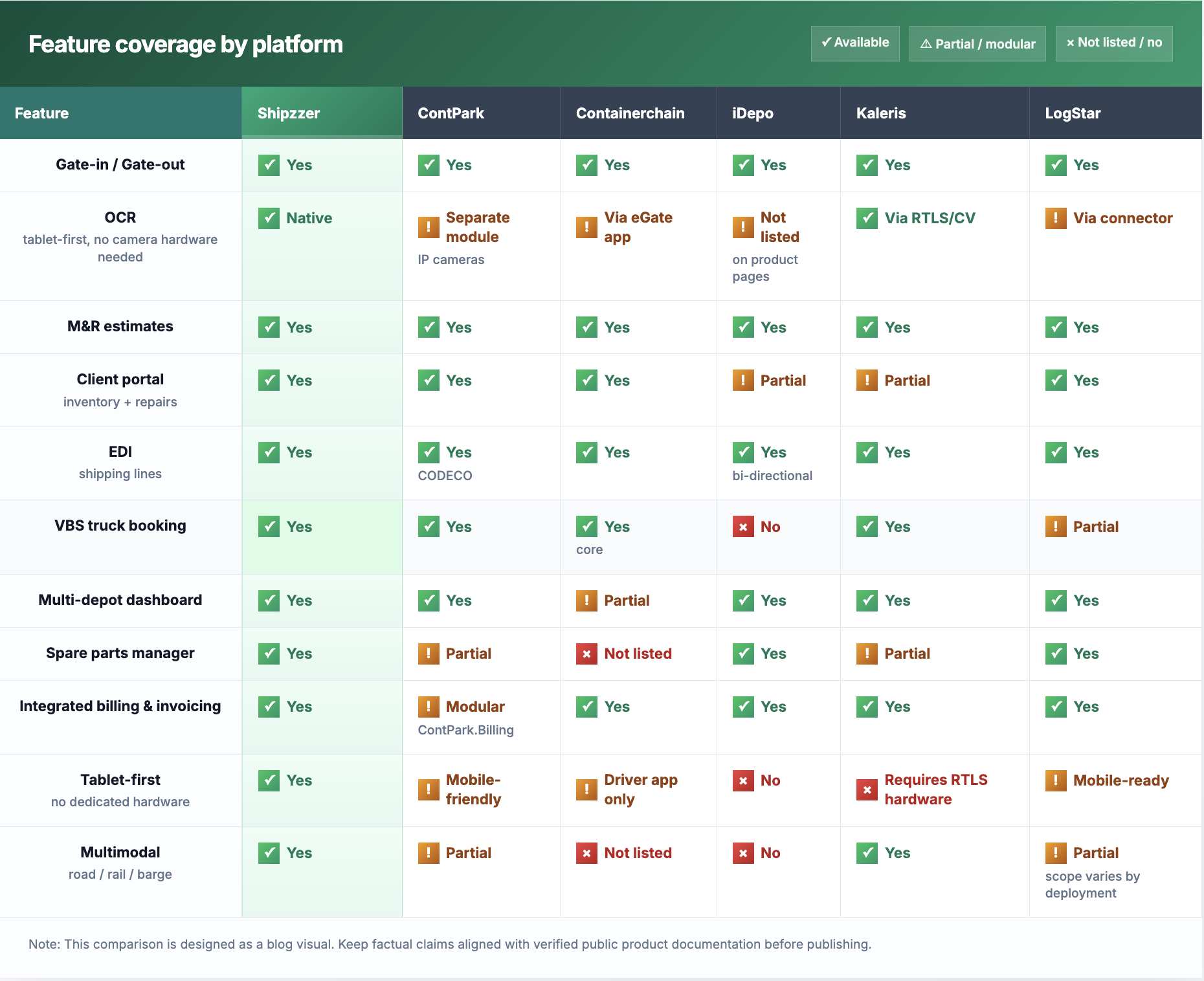
    Table of best yard management software 2026

    ✅ Confirmed from public product pages  ⚠ Available but limited or via add-on  ❌ Not listed as a native feature — sources verified April 2026

    Want to see how Shipzzer manages container depots in real time?  👉 Book a Demo  — tablet OCR, EMR quotes, multi-depot dashboard. No slides, just the real workflow.

    The right yard management solution depends less on feature count and more on one question: does this platform understand how your specific depot operation actually works?

    The honest test to run with any vendor: ‘Show me exactly how a container comes in, gets surveyed, gets a repair quote generated, and gets that quote approved by the shipping line — in your system, on a tablet, today.’ The answer tells you everything.

    Choose Shipzzer if you run a small or medium inland multimodal container depot, your team works with tablets on the yard floor, and you need container storage, OCR, EMR quotes, shipping line approval, multimodal tracking, full workflow automation, rich functionality, EDI automation, and real-time multi-depot view in one uninterrupted workflow.

    ContPark is the right fit if you manage an inland depot or ICD with significant volume and need modular cloud coverage with strong yard visualisation, CFS capability, and broad EDI.

    For depots where gate congestion and truck turnaround time are the primary challenge, Containerchain stands out — its VBS and eGate automation are among the strongest for high-throughput operations.

    iDepo suits operators running a dry container depot who want a proven web-based system covering the full depot lifecycle, used across Asia-Pacific, Africa, and Europe.

    Enterprise-scale operators with dedicated IT resources will find Kaleris a strong match, particularly when RTLS precision, deep TMS/WMS integration, and Gartner-recognised analytics are priorities.

    LogStar is ideal if you manage a mid-to-large inland depot, dry port, or ICD with complex multimodal operations (road + rail + barge) and need ERP integration alongside depot management.”

    👉 Not sure which fits your depot? Schedule a call with Shipzzer — we will tell you honestly if we are the right fit or not.

    This is one of the most common sources of confusion when depot operators start evaluating software. They are not the same thing, and choosing the wrong category is an expensive mistake.

    A Terminal Operating System (TOS) is designed for large port terminals — berth scheduling, vessel planning, crane allocation, and stevedoring operations at scale. Systems like Navis N4 handle thousands of container moves per day across a port. They require significant IT infrastructure, dedicated teams, and enterprise budgets.

    Yard management software for container depots focuses on what happens inside an inland depot — gate in/out, damage inspection via tablet, EMR repair quotes, shipping line EDI approval, yard inventory, spare parts tracking, and billing. It is built for the depot team working on the yard floor, not for port crane operators and berth planners.

    The practical test: if your operation involves vessel scheduling, berth windows, or stevedoring — you need a TOS. If it involves container intake, damage surveys, EMR quotes, and storage at an inland depot — you need depot yard management software.

    Shipzzer is not a TOS. It is built exclusively for inland container depot operations — from gate in to EMR quote to invoice — used by the yard team on standard tablets.

    What is the difference between a yard management system (YMS) and a terminal operating system (TOS)?

    A terminal operating system (TOS) is designed for large port terminals handling thousands of container moves daily, with vessel scheduling, berth planning, and crane allocation as core features. A yard management system for container depots focuses on storage, gate moves, M&R repairs, and shipping line communication. Shipzzer is designed for depot-scale operations. For IICL container inspection standards relevant to depot surveys, see iicl.org.

    Can yard management software work on a tablet without fixed camera hardware?

    Yes — Shipzzer is built tablet-first. Your team scans container numbers like MAEU 123456 5 from the yard using OCR on a standard tablet, with no fixed cameras required. ContPark’s OCR (VisionAI) is a separate module that requires IP camera infrastructure. Containerchain’s eGate app is designed for truck drivers, not depot operators doing inspections. iDepo’s public product pages do not list a native OCR module. Learn more about the mobile yard management app.

    What is EMR in container depot management?

    EMR stands for Equipement Maintenance and Repair. It covers container damage detection, repair cost estimation, and shipping line approval. In Shipzzer, this runs from inspection to client-approved quote without phone calls or email chains. See how the EMR quotation feature works in detail.

    Does LogStar support inland container depots?

    Yes. LogStar specifically targets inland depots, ICDs, dry ports, and multi-modal hubs. Their product LogStar Depot Plus covers gate management, yard planning, M&R, billing, EDI, and multimodal operations. It is positioned for mid-to-large operations and requires an implementation project. Pricing is custom and quote-only.

    Do any competitors charge per transaction rather than a flat subscription?

    No public pricing was found confirming per-transaction fees for Containerchain.

    Their terms of use reference transaction processes and billing details, but explicit per-transaction pricing for depot operators was not confirmed from a current official pricing page. All competitors on this list operate on custom quote pricing. Shipzzer uses a subscription model with predictable monthly fees.

    Is yard management software suitable for a small container depot?

    Yes — if you choose the right one. Enterprise platforms like Kaleris and LogStar are built for large-scale operations and will be overbuilt and over-budget for most SME depots. Shipzzer and iDepo are the most SME-appropriate tools on this list. Shipzzer specifically targets depots handling 20 to 400 containers per day with a fast deployment model and no heavy IT requirement.

    The best yard management software for a container depot in 2026 is the one that matches your actual operation — not the one with the longest feature list or the biggest brand name.

    If you manage a small or medium container depot, your real question is: which tool will your yard team actually use, which one handles EMR quotes without creating extra work, and which one connects directly to the shipping lines you work with — from a tablet, today.

    Shipzzer was built to answer all three — with tablet-first OCR, automated gate, yard and EMR workflow, EDI-compliant shipping line approval, multimodal depot tracking, and a live multi-depot dashboard your whole operation can run from day one.

    👉 Ready to see it on your depot? Book a free demo with Shipzzer — no slides, just the real workflow.

  • How to Reduce Extra Moves in a Container Yard

    How to Reduce Extra Moves in a Container Yard

    Table of Contents

    1. What Are Extra Moves in a Container Yard?
    2. Why Extra Moves Cost You More Than You Think
    3. The Real Causes of Yard Reshuffling
    4. How a Yard Management System Reduces Extra Moves
    5. Before vs. After Digital Yard Management
    6. When Should a Depot Invest in a YMS?
    7. FAQ

    Extra moves in a container yard are one of the highest hidden costs in depot operations. Every unnecessary container movement wastes fuel, labour time, and equipment capacity.

    In many depots, container yard extra moves quietly reduce productivity by 15–25% without managers realizing it.

    This guide explains what causes extra moves, how to measure their real cost, and how a yard management system like Shipzzer helps you reduce container yard inefficiency — without hiring more staff. See how Shipzzer optimizes your yard

    1. What Are Extra Moves in a Container Yard?

    An extra move is any container handling operation that was not strictly necessary to complete a customer order. In other words, a move that only happened because a container was in the wrong place at the wrong time.

    Here’s a simple example. A driver arrives to collect the container MAEU 123456 5. That container is at position C3 — but it has two other containers stacked on top of it. Your equipment operator has to lift those two boxes off, grab MAEU 123456 5, and put the others back. That’s four extra moves per truck visit.

    Now multiply that by 30 to 150 trucks per day. The numbers add up fast. In a busy inland depot, extra moves represent thousands of equipment hours lost per year, with no revenue attached to them.

    2. Why Extra Moves Are Costing You More Than You Think

    Most depot managers know extra moves are a problem. But very few have calculated their real cost. Here’s what each unnecessary move actually burns through:

    • Fuel: Each reach stacker or crane cycle burns diesel. An extra move = extra fuel cost with zero billable output.
    • Equipment wear: unnecessary movements accelerate tyre, engine, and boom wear — shortening asset lifespan.
    • Labour time: your operator is paid to handle cargo, not to undo poor positioning decisions made hours earlier.
    • Gate congestion: reshuffling during peak hours creates queues at the gate, delays truck departures, and irritates clients.
    • Client dissatisfaction: repeated delays at pick-up lead to complaints, credit notes, and eventually lost accounts.
    • Multi-depot reporting gap: if you manage more than one site, invisible extra moves compound across locations with no consolidated view.

    Quick estimate: If your depot handles 80 trucks per day and 20% involve at least one extra move, that’s 16 unnecessary moves daily. At €8–€12 per move in fuel and labour, you’re burning up to €140+ every single day — over €50,000 per year.

    3. What Causes Container Yard Extra Moves?

    Extra moves don’t happen by accident. They’re the predictable result of specific operational gaps. The most common causes in inland container depots are:

    • Lack of real-time yard visibility: if your team can’t see where every container is right now, positioning decisions are guesses.
    • Without accurate inventory data in the software, daily audits and stack reconciliation become impossible — there is no reliable way to compare system records against the physical position of containers in the yard and correct misaligned stacks before they cause extra moves.
    • Manual planning tools (Excel, whiteboards, paper): static records go stale the moment a move happens. The yard and the list are never in sync.
    • No OCR at the gate: without automatic container number recognition on arrival, check-in errors create wrong position records from the start.
    • Containers are placed wherever space is available — with no consideration for departure schedule, shipping line grouping, load status, or availability. 

    The result: high-priority units get buried under lower-priority ones, and retrieving them requires costly reshuffling

    • No pre-arrival planning: the truck arrives before the team knows which container to prepare. Reshuffling happens reactively, under time pressure.
    • Multiple shipping line systems open in parallel: operators switch between 3 to 7 different platforms, losing time and creating data inconsistencies.
    • New crane operators lack familiarity with the yard layout and the container distribution across bays. Without in-cab system guidance, undertrained operators routinely place containers in the wrong positions — turning a training gap into a yard-wide stacking problem

    The root cause behind all of these is the same: the depot is operating without a connected, real-time picture of the yard.

    4. How a Yard Management System Reduces Extra Moves

    A yard management system (YMS) replaces disconnected tools with one live view of the depot. Here’s how each core feature directly attacks extra moves.

    Real-Time Container Visibility

    With Shipzzer, every container has a known position at all times — updated automatically after each move. Operators see the live yard map on their tablet and can locate any unit in seconds. No more guessing. No more reshuffling because someone checked a spreadsheet that was three hours out of date.

    Tablet-Based Inspections with OCR at the Gate

    When a container like MAEU 123456 5 arrives at your gate, Shipzzer’s OCR reads the container number directly from a tablet photo — no manual entry, no typos. 

    The unit is instantly registered in the system with its correct ID, condition, location, status, customer, size, and type — all captured on-site using a tablet. No fixed camera infrastructure, no desktop workstation required

    This single step eliminates a major source of wrong-position records. A container entered correctly from the start is a container that gets stacked the first time correctly.

    Smart Stacking Logic

    Shipzzer applies configurable stacking rules to guide where containers are placed. Departure-priority units are kept accessible. Heavy containers go to the bottom. Shipping line groupings are respected. The system flags stacking decisions that would create future extra moves — before they happen.

    Planning Before the Truck Arrives

    Depot managers can view upcoming bookings and prepare the yard accordingly. When a truck is scheduled for tomorrow morning, the team can reposition containers tonight — during low-activity hours, with no time pressure and zero customer impact. That proactive move prevents three or four reactive extra moves the next day.

    Containers awaiting evacuation are automatically assigned to dedicated bays, separate from the general yard. The same applies to export-bound containers — they are pre-staged in their own bay ahead of time, ensuring they are immediately accessible when needed

    When a container is moved to access another unit, and a gate-out order comes in for that first container mid-move, the crane operator is instantly notified not to restack it — but to redirect it to a staging zone near the exit instead. This eliminates an unnecessary move and saves critical turnaround time

    Centralized EMR and Damage Workflow

    When a damaged container is identified at inspection, Shipzzer triggers the repair workflow directly: damage photo → EMR estimate via EDI → approval system → repair with spare parts tracking → automatic status update. No extra moves were caused by a container stuck in the wrong zone because its repair status was unclear. Learn more: /features/emr-container-quotes/

    Multi-Depot and Multimodal Visibility

    If you operate more than one depot — or handle containers arriving by road, rail, or inland waterway — Shipzzer gives you a single dashboard across all sites and all transport modes. Extra moves at depot B no longer go unnoticed while you’re focused on depot A.

    📅  Book a Demo — See how Shipzzer reduces unnecessary container handling in real time.

    5. Before vs. After: Digital Yard Management

    Here’s a direct comparison of what changes when a depot moves from manual processes to Shipzzer:

    Without a Yard Management SystemWith Shipzzer
    Blind stacking — containers placed by habitControlled stacking based on departure priority
    Manual tracking on spreadsheets or whiteboardsReal-time data accessible from any tablet
    Reactive moves — reshuffling when the truck arrivesPlanned positioning before the truck arrives
    No OCR at the gate — errors at check-inOCR reads MAEU 123456 5 instantly on arrival
    Multiple shipping line systems open in parallelCentralized multi-depot view in one platform
    No visibility on turn-time or revenue per clientFull reporting: stock, turn-time, client revenue
    Lost containers = lost revenueComplete container history from gate-in to gate-out

    6. When Should a Depot Invest in a Yard Management System?

    You don’t need to be a large operation to benefit from a YMS. Here are the clear signals that it’s the right time to act:

    • Your reshuffling rate is above 15% of total moves per day
    • Gate congestion or wrong container delivery is a recurring complaint from trucking companies or shipping lines
    • Your team uses more than two systems simultaneously to manage operations
    • You manage more than one depot and have no consolidated reporting
    • You’re losing track of containers under repair or in waiting status
    • Your turn-time data, client revenue, and spare parts usage are not visible in one place
    • You’re running inspections on paper, and photos are stored in a phone gallery, not a system
    • Finance and billing teams spend their time chasing operations for manual reports just to figure out what to invoice — a slow, error-prone process that delays cash flow.
    • You have no real-time visibility into inspection progress, revenue per client, turn-time per client, or what your field teams are actually doing on the ground

    Shipzzer is built specifically for small and medium inland container depots. It’s a pay-per-use SaaS platform — no per-user licences, no high upfront cost. You can add new shipping line clients via EDI without extra fees. And your full container history is retained long-term (5+ years) for compliance and audit purposes.

    → Explore the full platform

    7. FAQ — Frequently Asked Questions

    What is an extra move in a container yard?

    An extra move is any container handling operation — by crane, reach stacker, or other equipment — that was not required to complete a customer order. It typically occurs when a container is inaccessible because other units are stacked on top of it or in its way. Extra moves consume fuel, equipment capacity, and operator time without generating revenue.

    How do you calculate yard inefficiency?

    A simple method: divide the number of extra moves by total moves in a given period, then multiply by 100. A rate above 10% is a strong signal that stacking logic or visibility tools need improvement. To get the cost impact, multiply the number of extra moves by your estimated cost per move (fuel + labour per handling cycle).

    Can software reduce reshuffling in a container yard?

    Yes — and it’s the most scalable way to do it. A yard management system gives your team real-time position data, smart stacking guidance, and pre-arrival planning tools. This shifts your operation from reactive (fix the problem when the truck arrives) to proactive (position containers before the truck arrives). Depots using Shipzzer report significant reductions in unnecessary moves after the first week of use.

    How much can a yard management system save?

    Shipzzer customers save up to 30% on operational costs. The savings come from multiple sources: fewer extra moves, faster gate-in via OCR, reduced admin time, better equipment utilization, and fewer billing errors. The exact figure depends on your current reshuffling rate, daily volume, and equipment fleet — but even a modest improvement in yard efficiency pays for the system quickly.

    Does Shipzzer work for multi-depot operations?

    Yes. Shipzzer is built for depot managers who operate across multiple sites, including depots handling road, rail, and inland waterway containers. The multi-depot dashboard gives you consolidated reporting on stock levels, turn-time, client revenue, and spare parts across all your locations — in one place.

    8. Conclusion: Stop Managing Chaos. Start Managing Clarity.

    Extra moves are not a staffing problem. They’re a visibility problem. When your team can’t see the yard in real time, every decision is a guess — and guesses create reshuffling.

    Shipzzer gives inland depot managers the tools to eliminate that guesswork: OCR at the gate, smart stacking logic, real-time container tracking, proactive planning, and full multi-depot reporting. All from a tablet. No heavy hardware. No per-user licence fees.

    The yard can run smoothly. It starts with one demo.

    🚀  Schedule a Call — Let’s show you how Shipzzer reduces extra moves at your depot.

    About Shipzzer

    Shipzzer is a SaaS yard management platform designed exclusively for inland container depots. Based in Marseille, France, Shipzzer provides OCR container recognition, digital EMR quotation, multi-depot reporting, VBS gate management, and complete container history tracking — all accessible from a tablet. Pay-per-use. No extra EDI costs. Built for depots that handle 30 to 300+ containers per day.

  • How to Choose Yard Management Software | Shipzzer

    How to Choose Yard Management Software | Shipzzer

    For a container depot, choosing yard management software isn’t an “IT project”. It’s a turning point.

    It’s the moment where spreadsheets, walkie-talkies, and paper tickets can’t keep up with 30–150 containers moving through your yard every day. Trucks queue at the gate, photos disappear between devices, and repair quotes pile up in email chains.

    This guide walks you through how to choose yard management software that fits a small or medium depot — without overpaying for terminal-grade systems or locking yourself into license-heavy tools.

    If you want to see a concrete example, you can explore the /solutions/yard-management-software/ afterwards.


    Start with your depot reality (not the feature list).

    Before you look at a single demo, write down how your depot actually works today.

    Think in concrete terms.

    Volume per day: How many containers move through your gate on a normal day? 30? 80? 150? Do you see peaks in the morning or on certain days of the week?

    Yard size & layout: Compact yard with a single parking zone? Or multiple areas — reefer section, long-stay area, repair zone?

    Repair intensity: Quick touch-ups only, or heavy repair work with EMR estimates sent to shipping lines? How many repair quotes do you handle per week?

    Number of customers: One or two key shipping lines, or 15+ customers with different rules, SLAs, and EDI expectations?

    Single vs multi-depot: Operating one site today but planning a second? Or already juggling several yards with no common view?

    This snapshot is your filter. Any yard management software you evaluate should clearly explain how it fits in this reality — not just show flashy dashboards.


    Why do most YMS fail in small and medium depots?

    Many yard systems were designed for large terminals or enterprise groups, then pushed down to smaller depots. That’s usually where problems start.

    Too complex for daily operations. Menus everywhere, codes for everything, workflows that need an IT manual. Your operators fall back on paper notes because the system is too heavy.

    Desktop-only thinkingSystems that expect people to sit in front of a PC all day. In a depot, the reality is the opposite: operators are at the gate, in the yard, near the stack — with a tablet in hand, not chained to a desk.

    Heavy hardware and long deployments. Local servers, special scanners, fixed workstations. You wait months, spend heavily on hardware, and still get something your team resists using.

    Per-user or per-module licenses: “One license for the gate, one for yard, one for repair, one for reporting…” By the time you equip everyone, the bill explodes, and you start limiting who can log in, which kills adoption.

    All of this translates into cost, friction, and resistance to change. The right YMS for a small or mid-size depot should feel like an operational tool first, and a piece of software second.


    How to choose yard management software: the 6 criteria that actually matter

    Once your depot reality is clear, you can evaluate the software with a practical checklist.

    1. Tablet-first operations (not desktop software).

    In a depot, the action happens at the gate and in the yard. Your YMS should be designed so that most work happens on a tablet:

    • Easy to use with gloves or in bad weather
    • Clear the screen for check-in and check-out
    • No need to run back to the office PC to confirm action.

    If a vendor’s demo spends 90% of its time on a big desktop interface and only 2 minutes on a tablet view, that’s a red flag. Your operators need the tablet all day — managers can work from the desktop.

    2. Gate-in, inspection, and yard moves on the same tablet

    Look for one continuous flow:

    • The truck arrives and is identified.
    • Container data captured (plate, container number like MAEU 123456 5, status, customer)
    • Photos taken with a tablet
    • Initial condition checks
    • Yard location is assigned and updated when the container moves.

    If these steps live in different tools, you’ll always lose time and data. A good YMS lets the gate clerk and yard operator use the same interface, so updates are instant.

    Bonus points if the system uses OCR to recognize container numbers automatically from photos or scans — fewer typing errors, faster check-ins.

    3. Photos captured once, reused everywhere

    Photos are crucial for depots:

    • Proof of condition at gate-in
    • Support for EMR and repair estimates
    • Evidence for disputes with customers

    Your YMS should let operators take photos directly from the tablet during gate-in or inspection, auto-link them to the right container, and instantly reuse them for EMR, repair quotes, and the customer portal — no re-upload needed.

    If your future system still expects someone to download photos from a camera, rename them, and upload them to another tool, you’re not really getting a digital depot.

    4. Integrated EMR and repair workflows

    For many depots, repairs are a major part of their revenue. Treat EMR as a core criterion, not a “nice to have”.

    Ask vendors to show:

    • How are damages created from inspections?
    • How is a repair estimate built (with codes, parts, labor)
    • How are quotes sent to the customer or shipping line?
    • How approvals and rejections are tracked
    • How is the final repair linked back to the container history?

    You want an EMR module tightly connected to yard operations, not a separate system. Look for flows that comply with common EDI practices of major shipping lines to speed up validation.

    5. Fast deployment (weeks, not months).

    A small or medium depot can’t wait for a year for a new system.

    Check this:

    • The YMS is cloud-based (no on-site servers to buy and maintain).
    • Tablets are enough — no exotic hardware required.
    • Configuration can be done in a few weeks, not after endless workshops.
    • Your team can be trained quickly with simple visual screens.

    Ask for a realistic deployment plan for one depot, including data import, user training, and go-live. If the project plan looks like a full ERP rollout, it’s probably overkill.

    6. Cost structure that scales with your depot

    The pricing model should make sense whether you have 1 depot with a small team or you grow to 2–3 depots with higher volumes.

    Watch out for:

    • Heavy per-user pricing that forces you to share logins
    • Extra fees for each module (report, EMR, OCR, multi-depot)
    • Per-client charges or EDI fees that grow with every new customer

    Prefer models where you pay for usage and value, not for every click. You want to give access to all the people who need it: operators, planners, repair teams, and sometimes even customers via a portal.

    Make sure your system delivers clear operational reporting — inventory, dwell time, turn time, and client-specific revenue. Many yard tools promise “analytics,” but what you actually need is a fast way to answer: Where’s this container? How long has it been here? What’s blocking this truck?

    A good YMS should answer these questions in seconds.

    If you plan to scale to multiple sites.


    Mistakes to avoid when choosing a YMS

    Even experienced depot managers fall into these traps.

    Choosesoftware is designed for terminals. Terminal software can be powerful… and completely oversized. You’ll pay for features you don’t use and workflows that don’t match a depot.

    Buying features operators will never touch. If a feature won’t be used at the gate, in the yard, or in repairs, it’s probably not worth paying for at your scale.

    Ignoring repair workflows. Some YMS focus only on yard moves and inventory. If repairs are a significant part of your business, EMR must be integrated — otherwise you’ll keep Excel and emails on the side.

    Underestimating license creep, “We’ll start with 3 users and see,” often becomes 12 users plus extra modules. Check how the price evolves when you equip your whole team and add a second depot.

    Not involving operators early. If you choose based only on a management demo, you may discover later that the app is too complex in the field. Let gate clerks and yard operators test the tablet interface from day one.


    When a YMS is the right move (decision trigger)

    How do you know it’s time to stop patching with spreadsheets and start a real YMS project?

    Typical signals:

    Long truck queues at peak times. Drivers wait because check-in is slow, data is incomplete, or planning is manual.

    Lost or inconsistent photos. You can’t always prove the container condition at gate-in, or photos are stuck on individual devices.

    Delayed billing and repair quotes. Interchange reports, EMR, and invoices take days or weeks to prepare.

    Operators are in constant firefighting mode. Your team spends the day answering “Where is my container?” instead of running through the yard.

    No clear visibility for managers. You can’t see live inventory, dwell time, or capacity across depots. KPIs live in Excel files sent once a week.

    If several of these points sound familiar, it’s a strong sign that modern, tablet-first yard management software will bring relief quickly.


    Next step for your depot

    If your depot has reached this stage, the next step isn’t more spreadsheets, extra Excel macros, or another shared inbox.

    It’s choosing yard management software designed for real depot operations, where containers, photos, EMR, and yard moves live in one system.

    To see how this looks in practice for container depots like yours:

    👉 /solutions/yard-management-software/

    👉 /contact/ to walk through your depot reality and see if the fit is right.

  • Yard Management System for Container Depots: Complete Guide

    Yard Management System for Container Depots: Complete Guide

    Introduction: Why Container Depots Need a Yard Management System

    Container depots are under increasing pressure. Volumes keep rising, clients expect faster turnaround, regulations require full traceability, and customers demand real-time visibility. In this context, a Yard Management System (YMS) is no longer optional — it’s essential.

    Once your depot handles over 30 containers a day, manual tools hit their limit. Whiteboards, spreadsheets, and radio calls quickly become sources of delay, stress, confusion, and costly blind spots.

    Here are the most common pain points:

    • Containers are lost in the yard due to outdated records. 
    • Trucks were blocked because yard moves weren’t logged.
    • Repair workflows slowed down by scattered photos and manual approvals.
    • Invoices are delayed due to missing or untraceable data.
    • Exit errors, booking mistakes, and unrecorded moves.
    • Operations are still dominated by paper and Excel.
    • No real reporting on inventory, spare parts, turn-times, or revenue by client

    These issues waste time, create friction, and damage trust. A depot processing 60 trucks per day can lose up to 10 hours daily due to these inefficiencies.

    Shipzzer removes these obstacles.

    This guide shows you how.

    Shipzzer eliminates these pain points. This guide explains how.


    The Hidden Costs of Depot Inefficiency

    Beyond the visible delays and frustrations, manual depot operations create hidden costs that accumulate over time. Moreover, these costs often go unnoticed until they become critical business problems.

    Lost revenue from capacity constraints:

    When you can’t accurately track container positions, you underutilize your yard space. Typically, depots operating manually achieve only 60-70% of their theoretical capacity because operators need buffer zones to avoid confusion. However, with proper yard visibility, the same physical space can handle 20-30% more containers simply through better organization and precise stacking.

    On top of that, poor tracking leads to unnecessary crane moves — especially for full-out containers. These “parasitic movements” not only waste time but generate hidden operational costs that add up quickly.

    Customer attrition from service gaps:

    Modern logistics companies expect digital integration. When your depot requires phone calls for status updates, manual photo requests, and email chains for approvals, you create friction that drives customers toward competitors with self-service portals. As a result, the cost isn’t just one lost client—it’s the cumulative effect of slower growth and reduced referrals.

    Compliance and liability exposure:

    Manual record-keeping creates gaps in your audit trail. Therefore, when damage disputes arise or regulatory inspections occur, incomplete documentation can result in rejected claims, penalty fees, or lost contracts. For instance, a single disputed damage claim without proper photographic evidence and timestamps can cost thousands in write-offs or legal fees.

    Operational scaling limitations: Manual processes don’t scale linearly. Adding 50% more volume doesn’t just require 50% more staff—instead, it often requires 80-100% more because coordination complexity increases exponentially. For example, a depot handling 100 containers daily with manual tools might need 10-12 staff members, while a YMS-enabled depot could handle the same volume with 5-6 people.

    Staff turnover and training costs:

    Manual systems rely heavily on institutional knowledge. When experienced operators leave, they take critical information with them—which containers go where, which clients have special requirements, and how to navigate the informal processes. Consequently, training new staff takes weeks instead of days, and productivity suffers during the transition.

    Hidden costs of ignoring multimodality

    Sustainable depots are increasingly multimodal — managing flows by road, rail, and inland waterways. But without a centralized system to coordinate these channels, scheduling gets chaotic, resources are wasted, and data visibility disappears. Poor multimodal management leads to missed slots, idle cranes, and rising costs.


    What Is a Yard Management System for Container Depots?

    A Yard Management System (YMS) for container depots centralizes and digitizes all operations—from gate-in to yard placement, inspection, repair, and release. As a result, everyone, from operators to managers to clients, works from a shared, real-time view.

    Understanding the difference between YMS, WMS, and TMS is important:

    • YMS (Yard Management System) is designed specifically for inland depots. It tracks containers and equipment on-site, manages gate-in/gate-out workflows, EMRs, stacking logic, and full traceability. It’s what ensures your yard runs smoothly, in real time.
    • WMS (Warehouse Management System) optimizes warehouse inventory and indoor storage, but doesn’t handle outdoor yard logistics.
    • TMS ( transportation management system) focuses on transport flows rather than container positioning or depot management.
    • TOS (Terminal Operating System) is tailored for port terminals, not inland depots. It handles vessel planning, berth allocation, and high-volume automation — often too complex or irrelevant for smaller depot operations.

    With a proper YMS, you gain real-time visibility into container location and condition, OCR container recognition at the gate and in the yard, triggered workflows for inspections, repairs, and billing, and automated traceability with complete audit trails.


    The Cost of Manual Yard Operations

    Manual workflows break down in silence.

    The damage often comes from small inefficiencies that repeat every day.

    • Trucks may wait over 4 hours at the gate.
    • Operators spend time searching for containers.
    • Photos get lost between devices or emails.
    • Repairs drag on for days due to back-and-forth email chains.
    • Clients call multiple times a day for updates.

    And for every repair quote, depot technicians must log into as many systems as they have clients — one for each shipping line. That means 10–15 browser tabs open, switching platforms to enter estimates and retrieve approvals. It’s tedious, time-consuming, and entirely avoidable.


    These issues lead to real, measurable losses.

    • Truck wait time: 15–40 min in manual depots vs 3–6 min with a YMS
    • Lost containers: 2–8 per month manually vs 0–1 with digital traceability
    • Invoicing time: Hours spent reconciling info vs instant billing with synced data

    A modern YMS automates, connects, and secures your entire workflow — so your team can focus on execution, not firefighting.

    decreases from 15–45 minutes to just 2–5 minutes. Furthermore, operator time lost to searching drops from 20–30% of a shift to just 5–10%.

    Several warning signs indicate you’ve outgrown manual tools. These include frequent container searches, driver complaints about long wait times, clients requesting photos that you can’t locate, constant corrections to records, and delayed invoices due to missing data.


    What a Good Depot YMS Actually Does

    A Yard Management System for container depots should simplify operations, not add complexity. Here’s what to expect:

    Fast, tablet-first gate workflows

    The right system streamlines every gate-in and gate-out in real time. Operators use a tablet to:

    • Scan containers via OCR.
    • Take auto-timestamped photos
    • Collect digital signatures
    • Conduct full inspections — directly on the tablet, as part of the gate-in process.

    All data is captured once and flows instantly through the entire workflow: inspection, EMR, quoting, billing, and client portal — with no double entry or rework.

    Accurate, real-world yard mapping

    Your yard layout — zones, bays, lanes — is fully reflected in the system. Operators log moves with a tap, and the whole team sees live container positions in real time.


    Structured EMR repair flow

    The repair process is fully digital — and faster than traditional methods:

    • Damage is detected and documented with photos.
    • The system auto-generates a quote via EDI, aligned with shipping line standards.
    • A validation threshold system allows work to begin without waiting for client approval.
    • Repair steps are tracked, spare parts are managed automatically, and container status is updated in real time.

    Result: fewer delays, full traceability, and clean documentation for invoicing.


    Smart reporting and real-time alerts

    You get a full 360° view:

    • Live inventory overview
    • Dwell time and turn-time by client.
    • Alerts for exceptions like blocked containers or delayed repairs
    • Revenue breakdown by client, stock level reports, and full audit trails

    Multi-depot and multimodal management

    Manage all your depots from one dashboard — by road, rail, or inland waterway. Allocate containers across sites, balance capacity, and coordinate flows in real time.


    Client portal = fewer calls, more autonomy

    Clients log in 24/7 to view container status, photos, repairs, and history — no more phone calls or email chases. Your ops team can focus on what really matters: keeping the yard moving.


    Billing integration that fits your stack

    The system can generate ready-to-send invoices or integrate directly with your centralized billing software (like Sage, Odoo, Netsuite, SAP…). Data flows automatically, without re-entry or delays.


    Key Features to Look for in a Depot YMS

    Not all Yard Management Systems deliver equal value. When evaluating solutions for your container depot, certain features separate functional tools from transformative platforms.

    Mobile-first architecture matters more than desktop capabilities:

    Your operators work in the yard, not at desks. Consequently, you need systems designed from the ground up for tablet and mobile use, with interfaces optimized for outdoor viewing conditions, glove-friendly touch targets, and offline capability for when connectivity drops.

    Flexible workflow configuration without custom development:

    Every depot operates slightly differently. Therefore, your YMS should accommodate your specific processes without requiring expensive customization or developer intervention. This means configurable inspection checklists, customizable EMR workflows, adjustable user permissions, and the ability to define your own container statuses and yard zones.

    Seamless integration with your existing tools

    A YMS doesn’t operate in a silo — it should connect smoothly with your ecosystem. Look for platforms offering API access and native integrations with the tools you already use.

    The right system should:

    • Sync with your accounting/billing software (Sage, Odoo, SAP, etc.) for accurate, automated invoicing.
    • Connect to your customers’ TMS platforms for booking visibility and smoother coordination.
    • Interface with government systems to support customs or regulatory reporting when needed
    • And crucially: handle repair management entirely in-house — from damage detection to quote generation and container status update — without depending on third-party vendors

    Shipzzer is built to centralize it all, not fragment it.

    Scalability across multiple yards:

    If you operate more than one depot location, or plan to expand, your YMS should provide consolidated visibility across all sites while maintaining site-specific control. This includes centralized reporting across locations, shared customer data and pricing, consistent operational standards, and the ability to transfer containers between yards with full traceability.

    Audit trail and compliance features:

    Container depots operate in a regulated environment. Accordingly, your YMS should automatically create comprehensive audit trails including timestamped photos, user action logs for all status changes, complete container lifecycle history, and exportable reports for customs and regulatory requirements.

    Performance under real-world conditions:

    A system that works perfectly with 20 containers may struggle with 200. Therefore, before committing, understand how the YMS performs at scale, how quickly searches return results with thousands of containers in the database, whether the mobile app remains responsive during peak gate hours, and how the system handles simultaneous users across multiple devices.

    Scalability without hidden costs

    Your depot evolves — your YMS should follow without penalizing you.

    • The same system must support yard management, gate management, and EMR workflows — no need to buy extra modules later.
    • All historical data should remain accessible — whether it’s an interchange from last week or 5 years ago. No log retention limits, no hidden archiving fees.
    • As you onboard new clients, you shouldn’t pay extra to your system integrator for every new EDI setup, tariff configuration, or workflow adaptation — that should be part of the base offer.
    • And if your team grows? You shouldn’t be charged per user. A flat fee means cost visibility and predictable budgeting, no matter how your operations scale.

    With Shipzzer, scalability is built in — not sold as an upgrade.


    How Shipzzer Transforms Depot Operations

    1. Automating Operations: From Gate-In to Repairs

    OCR container recognition on tablets ensures fast, accurate gate-in, yard moves, and updates — no more manual entry errors. This same technology is also used for PTIs, washing, and CFS operations, capturing clean data from the start.

    EMR (Equipment Maintenance and Repair) is the beating heart of the system. When damage is detected, it’s photographed and linked to the container instantly. A repair quote is auto-generated via EDI. Based on predefined validation thresholds, repairs can start without waiting for client approval, reducing delays. The system tracks every step, manages spare parts stock, updates statuses in real time, and generates invoice-ready documentation — no emails, no silos, no back-and-forth.

    Intelligent bay management lets you apply stacking rules with multiple custom criteria per bay (client, size, status, etc.). The system then guides forklift operators in real time, prevents misplacements, and avoids unnecessary moves by enforcing those rules.

    2. Visibility, Planning, and Client Experience

    The real-time inventory dashboard doesn’t just show what’s in the yard. It gives full container history: entry date, type, size, client, transporter, weight, PTI info (validity, status), and any special notes. It replaces guesswork with complete situational awareness.

    The Vehicle Booking System (VBS) reduces congestion by allowing transporters to book gate slots in advance. That means smoother flow, less waiting, and better workload balancing for your gate and yard teams.

    Multi-depot management gives you control over all your sites — from one screen. Share data, balance loads, and standardize processes across locations.

    Spare parts management ensures repair teams never run out of stock. Reordering is automated based on usage trends, and delivery tracking is integrated — so maintenance never stops.

    The client portal offers 24/7 secure access to container status, photos, EMR progress, and history. Customers gain transparency. Your team gets fewer calls.

    Quotation acceleration uses EDI-compliant formats to validate repair quotes faster — cutting wait times and speeding up invoicing.


    Conclusion: From Operational Chaos to Clarity

    Manual tools don’t meet the realities of modern depot operations. If you recognize the warning signs—frequent searches, delayed invoices, daily firefighting—you’ve reached the threshold where a YMS is no longer optional.

    Shipzzer gives you one comprehensive tool to track, inspect, repair, and release containers. It provides live dashboards for managers, structured workflows for teams, photo-documented operations with traceable records, and instant client access to reduce calls and build trust.

    Don’t wait for operations to reach a breaking point.

    Schedule a call with our experts today and transform your depot with clarity.


    About Shipzzer

    Shipzzer is the first SaaS-based Yard Management System built specifically for inland container depots. It replaces spreadsheet chaos with real-time operational clarity — across one or multiple sites.

    From OCR scanning to EMR automation, from multimodal support (road, rail, waterway) to 24/7 client portals, every feature is designed to simplify daily operations, reduce costs, and eliminate friction.

    Unlike legacy tools, Shipzzer offers a fair, flat-fee pricing model with no surprise add-ons for more users, more clients, or more EDI connections — ensuring long-term control over your budget and scalability without hidden costs.

  • Container yard management system (CYMS): Why Managing Multiple Depots Should not Feel Like Chaos

    Container yard management system (CYMS): Why Managing Multiple Depots Should not Feel Like Chaos

    If you’re juggling several depot locations, you already know the pain: scattered Excel files, endless phone calls, and reports that are outdated by the time they reach your desk.

    What if you could see everything happening across your sites — from Marseille to Rotterdam — on a single, real-time depot visibility dashboard?

    That’s exactly what Shipzzer’s container yard management system (CYMS) delivers — a centralized, intuitive solution built for digital depot operations.


    Why Real-Time Visibility Changes Everything

    When depots operate in silos, information becomes fragmented, slow, or incomplete. This leads to issues such as:

    • A container arrives at your depot, but you have no trace of the emergency repair it underwent at the previous terminal — forcing your team to start investigations from scratch.
    • Clients request availability across your network, but stock data is split between locations, making it impossible to answer instantly or optimize bookings.
    • Your central spare-parts inventory serves multiple depots, yet you have no unified view of consumption trends or stock levels.
    • Import/export operations involve several sites, but coordinating them requires manual updates, calls, and spreadsheet consolidation.
    • Management requests performance metrics by location, and you spend hours compiling figures from disconnected systems.

    All of this slows you down. Meanwhile, digital-first depots using a smart container yard management system (CYMS) respond in minutes, not hours.

    Shipzzer’s platform unifies gate movements, inventory, and bookings into one live dashboard. It’s not just convenience — it’s a shift toward a connected, optimized way of working.


    The Hidden Costs of Disconnected Depots

    Lost Revenue Opportunities

    Without a global view via container yard management system (CYMS), you may decline a booking that another site could handle, or accept one without the required equipment, resulting in costly repositioning and frustrated customers.

    Wasted Staff Time

    When teams must search through emails, call other departments, or navigate multiple systems just to retrieve basic info, they lose time that should be spent serving customers and optimizing operations.

    Increased Container Downtime

    Without real-time depot visibility, containers sit idle in one depot while another faces shortages. Every idle hour impacts profitability.

    Compliance Risks

    Meeting EDI standards becomes difficult when data is inconsistent or manually updated. Errors lead to rejected messages and strained partner relationships.

    Decision-Making Delays

    Leaders operate reactively with outdated info. Strategic planning suffers, and opportunities are missed.

    • Preparing your annual budget means navigating by guesswork, while a CYMS (Container Yard Management System) with EMR and parts modules could tell you exactly what to order.
    • Sizing your workforce, especially for shift ops, becomes a challenge without visibility into actual demand patterns across locations.
    • Planning yard capacity – bays, reefer plugs, client allocations – requires accurate data. Without it, you waste time on container shuffling and inefficient movements.

    How It Works

    Step 1: Setup and Integration

    Connect your depots to Shipzzer. Our team tailors the  container yard management system (CYMS) to your structure, whether you have 2 or 20 locations. Setup takes days, not weeks.

    We integrate with your existing hardware: tablets used in the yard for scanning and photos — no need to start from scratch.

    We configure depot-client pricing, create user accounts, set up EDI flows, and tailor the system to your specific depot constraints.

    Step 2: Team Onboarding

    We train staff on both the web and tablet interface, define their roles, and walk through your operational processes.

    Most users are confident after one shift. They’ll also learn to use the customer portal if they need to open support tickets.

    Step 3: Real-Time Operations

    Once your team scans containers or logs updates, data flows instantly to your central dashboard.

    • No manual entry
    • No spreadsheet uploads
    • All workflows are automated based on role.
    • All EDI messages are generated in real time.

    What You Get Access To

    Live Inventory Dashboard

    View stock, bookings, and status (available, under repair, in transit) across all sites. Filter by depot, container type, condition, or customer.

    EDI-Compliant Quote Management

    Generate quotes instantly using real stock and pricing. Compliant with shipping line standards.

    Repair Documentation (EMR)

    Track every repair with photos, CEDEX codes, parts, and hours. Access full container repair history instantly.

    Gate Operation Records

    Track who approved each movement, when it happened, and in what condition. Flag issues fast.

    Analytics and Reporting

    Track KPIs like depot performance, turnaround times, container cycles, and revenue per depot.


    Real Benefits of Going Digital

    Instant Clarity

    No more calls. You check stock and status across all depots from one place.

    Faster Response

    When a container is damaged or stock dips, teams are notified immediately.

    Full Control

    Every action is traceable. No more back-and-forth on accountability.

    Operational Efficiency

    Less time chasing data, more time optimizing ops.

    Scalable Simplicity

    Whether you manage 2 or 10 depots — 10,000 or 300,000 containers — Shipzzer’s multi-depot management software scales with you.


    Final Thought

    Managing multiple depots doesn’t have to be complicated.

    With Shipzzer’s container yard management system (CYMS), your operations become streamlined, visible, and scalable.

    👉Book a demo and discover how Shipzzer helps you manage your depot network with clarity, speed, and confidence.

  • Système de gestion de dépôts de conteneurs (CYMS) : pourquoi gérer plusieurs dépôts est à votre portée?

    Système de gestion de dépôts de conteneurs (CYMS) : pourquoi gérer plusieurs dépôts est à votre portée?

    Si vous jonglez entre plusieurs dépôts de conteneurs, vous connaissez déjà la difficulté : fichiers Excel éparpillés, accès à plusieurs outils, appels téléphoniques interminables des clients et fournisseurs, et rapports obsolètes avant même d’arriver sur votre bureau.

    Et si vous pouviez voir tout ce qui se passe sur vos sites — de Marseille à Rotterdam — sur un seul tableau de bord en temps réel ?

    C’est exactement ce que le système de gestion de dépôt de conteneurs de Shipzzer offre — une solution centralisée et intuitive conçue pour des dépôts mono- ou multi-clients.

    Pourquoi la visibilité en temps réel change tout

    Lorsque les dépôts fonctionnent en silos, l’information devient fragmentée, lente ou incomplète. Cela entraîne des problèmes tels que :

    • Produire des rapports comparatifs sur l’utilisation de vos ressources, les revenus générés par dépôt ou encore les différents turn-times par client… Vous passez 3 jours à jongler entre les systèmes pour produire des données incomplètes.
    • Les clients demandent de la disponibilité sur l’ensemble de vos sites, mais les données de stock sont réparties entre ces derniers, rendant impossible de répondre instantanément ou d’optimiser les bookings.
    • Votre inventaire central de pièces détachées dessert plusieurs dépôts, mais vous n’avez aucune vue unifiée des tendances de consommation ou des niveaux de stock. Pas simple pour les achats de planifier des commandes unifiées.
    • Les opérations d’import/export impliquent plusieurs sites, mais leur coordination nécessite des mises à jour manuelles, des appels et la consolidation de feuilles de calcul.
    • La direction demande des indicateurs de performance par site, et vous passez des heures à compiler des chiffres provenant de systèmes déconnectés
    • Un conteneur arrive à votre dépôt, mais vous n’avez aucune trace de la réparation d’urgence effectuée sur le terminal précédent — obligeant votre équipe à recommencer les investigations de zéro..

    Tout cela vous ralentit. Pendant ce temps, les dépôts complètement digitalisés et offrant une vue à 360 degrés de leurs opérations grâce à un système intelligent de gestion de dépôt de conteneurs (CYMS) répondent en quelques minutes, pas en heures.

    La plateforme Shipzzer donne une visibilité complète sur les mouvements aux gates, l’inventaire et les bookings dans un tableau de bord en direct. Idem pour les interchanges, l’accès à la data et les innombrables rapports opérationnels. Ce n’est pas seulement une commodité — c’est un passage vers une façon de travailler connectée et optimisée.

    Les coûts cachés des dépôts déconnectés

    Opportunités de revenus perdues

    Sans vue globale via un système de gestion de dépôt de conteneurs (CYMS), vous pouvez refuser des bookings qu’un autre site pourrait gérer, ou en accepter une sans l’équipement requis, entraînant un repositionnement coûteux et des clients frustrés.

    Temps de personnel gaspillé

    Lorsque les équipes doivent chercher dans les e-mails, appeler d’autres départements ou naviguer dans plusieurs systèmes juste pour récupérer des informations de base, elles perdent du temps qui devrait être consacré au service des clients et à l’optimisation des opérations.

    Augmentation du temps d’arrêt des conteneurs

    Sans visibilité en temps réel sur le dépôt, les conteneurs restent inactifs (vos valeurs de turn-time de vides augmentent) dans un dépôt tandis qu’un autre fait face à des pénuries. Chaque heure d’inactivité impacte la rentabilité.

    Risques de conformité

    La fiabilité des informations dans les EDI (spécialement les devis) devient difficile lorsque les données sont incohérentes ou mises à jour manuellement. Les erreurs entraînent des messages rejetés et des relations tendues avec vos partenaires.

    Retards dans la prise de décision

    Les dirigeants opèrent de manière réactive avec des informations obsolètes. La planification stratégique en souffre et les opportunités sont manquantes.

    Préparer votre budget annuel signifie naviguer à l’aveugle, alors qu’un CYMS (système de gestion de dépôt de conteneurs) avec des modules EMR et des pièces détachées pourrait vous dire exactement quoi commander et comment gérer vos priorités.

    Dimensionner votre effectif, en particulier pour les opérations de nuit, devient un défi sans visibilité sur les modèles de demande réels de vos clients dans tous les sites.

    Planifier la capacité du parc — emplacements, prises frigorifiques, allocations clients — nécessite des données précises. Sans cela, vous perdez du temps avec le déplacement de conteneurs et des mouvements parasites coûteux.

    Comment ça fonctionne

    Étape 1 : Configuration et intégration

    Connectez vos dépôts à Shipzzer. Notre équipe adapte le système de gestion de dépôt de conteneurs (CYMS) à votre structure, que vous ayez 2 ou 20 sites. La configuration prend des jours, pas des semaines.

    Nous nous intégrons avec votre matériel existant : tablettes utilisées dans le parc pour la numérisation et les photos — pas besoin de repartir de zéro.

    Nous configurons la tarification dépôt-client, créons des comptes utilisateurs, mettons en place les flux EDI et adaptons le système à vos contraintes de dépôt spécifiques.

    Étape 2 : Intégration de l’équipe

    Nous formons le personnel sur l’interface web et la tablette, définissons ses rôles et parcourons vos processus opérationnels.

    La plupart des utilisateurs sont confiants après une heure de travail. Les interfaces sont intuitives. Ils apprendront également à utiliser le portail client s’ils ont besoin d’ouvrir des tickets de support.

    Étape 3 : Opérations en temps réel

    Une fois que votre équipe réalise ses premières opérations ou enregistre des mises à jour, les données affluent instantanément vers votre tableau de bord central.

    • Pas de saisie manuelle
    • Pas de téléchargement de feuilles de calcul
    • Tous les flux de travail sont automatisés en fonction du rôle
    • Tous les messages EDI sont générés en temps réel

    Ce à quoi vous avez accès

    Tableau de bord d’inventaire en direct

    Visualisez le stock, les bookings, les pré-notifications et le statut (disponible, en réparation, en transit) sur tous les sites. Filtrez par dépôt, type de conteneur, condition ou client.

    Gestion des devis conforme EDI

    Générez des devis instantanément en utilisant le stock et la tarification réels des pièces. Conforme aux normes des compagnies maritimes. Support des dernières releases d’UN/Edifact (Codeco, Coparn, Destim etc.)

    Documentation de réparation (EMR)

    Suivez chaque réparation avec photos, codes CEDEX, pièces et heures utilisées. Accédez instantanément à l’historique complet de réparation du conteneur.

    Registres des opérations de Gate

    Suivez qui a approuvé chaque mouvement et inspection, quand cela s’est produit et dans quel état le conteneur est rentré. Signalez rapidement les problèmes. Retrouvez vos interchanges en un clic s’il y a besoin de les renvoyer aux transporteurs.

    Analyses et rapports

    Suivez les KPI comme la performance du dépôt, les délais de traitement, les cycles de conteneurs et les revenus par dépôt. Visualisez votre fil d’activité en temps réel comme les conteneurs en attente d’inspection ou en attente d’accord client, ou en réparation. Éditez votre liste de baies ou de pointage en 1 clic.

    Avantages réels de la digitalisation

    Clarté instantanée

    Plus d’appels. Vous vérifiez le stock et le statut de tous les dépôts depuis un seul endroit (votre bureau ou votre canapé).

    Réponse plus rapide

    Lorsqu’un conteneur est endommagé ou que le stock de pièces détachées diminue, les équipes sont immédiatement notifiées.

    Contrôle total

    Chaque action est traçable. Plus d’allers-retours sur la responsabilité.

    Efficacité opérationnelle

    Moins de temps à chercher des données, plus de temps à optimiser les opérations.

    Simplicité évolutive

    Que vous gériez 2 ou 10 dépôts — 10 000 ou 500 000 gates à l’année — le logiciel de gestion multi-dépôts de Shipzzer évolue avec vous car il a été pensé pour cela dès sa conception.

    Réflexion finale

    Gérer plusieurs dépôts ne doit pas être compliqué.

    Avec le système de gestion de dépôt de conteneurs (CYMS) de Shipzzer, vos opérations deviennent rationalisées, visibles et évolutives.

    👉 Réservez une démo et découvrez comment Shipzzer vous aide à gérer votre réseau de dépôts avec clarté, rapidité et confiance.

  • Which Yard Management Software Model Should You Choose?

    Which Yard Management Software Model Should You Choose?

    You manage a container depot/Dry port (ICD).

    You juggle Excel sheets, phone photos, quotes sent by email, and multiple client or carrier interfaces for your team.

    Customers expect real-time visibility. Your teams re-enter data.

    You’re losing time.

    Good news: there’s a simpler path. Start digitizing your depot with yard management software — step by step.


    3 Strategic Yard Management Software Models

    When a depot wants to digitize operations, three main software options exist:

    • SaaS: Online yard management software via subscription. The provider hosts, secures, and updates it.
    • On-Premise: Installed on your own servers. You manage the infrastructure.
    • In-House: You develop your own software. Full control — and full responsibility.

    This guide helps you choose quickly — and wisely.

    Goal: Pick the yard management solution that best fits your operations, budget, and internal resources.

    Transparency: Yes, we offer a SaaS yard management platform. But this article is based on 25+ years of real experience in logistics — especially in inland container depots (ICDs) — not sales talk.


    The 3 Models, Explained Simply


    ✅ SaaS — The yard software that “just works”

    How it works:

    You log in and use it. The vendor takes care of everything else.

    In the yard:

    A tablet at the gate. OCR scans the container number. The file opens. Damage photos, EMR report, and quote sent in EDI via email or API.

    No servers to install. No updates to plan.

    • You manage: users, tablets/computers, and your internet connection.
    • You don’t manage: servers, backups, security, software updates.

    ⚠️ On-Premise — “Your servers, your risks”

    How it works:

    You buy licenses, install them on your own infrastructure, and maintain everything yourself.

    In the yard:

    A server room. Backups. Security patches. Outages to handle.

    Each new version requires downtime. You’ll need an internal IT team or a service provider. Sometimes this is offered by the software vendor.

    • You manage: everything.
    • The vendor provides: the yard management software and possibly support under contract.

    🚧 In-House — “Your software, your marathon”

    How it works:

    You recruit. You design. You build. You maintain.

    In the yard:

    You develop your own OCR, EMR, quoting system, and client portal.

    You manage the roadmap, fix bugs, and deal with turnover.

    Every new feature is a full project. You move away from your core mission — running a container depot — and start functioning like a tech company.

    Your IT team may already be bigger than your yard team. Count them to check.

    • You manage: product, code, testing, deployment, support, and infrastructure.
    • You control: everything — and carry all the weight.

    Which Yard Software Model Fits Your Profile?

    🧩 1 to 5 depots, with little or no IT team? → Choose SaaS.

    • Fast deployment
    • Low mental load
    • Annual cost under €150,000

    🧩 More than 5 sites, small IT team, or CIO? → On-Premise can work.

    • Viable if infrastructure is already in place
    • Good for deep system integrations
    • Annual cost: €1–2 million
    • Justified if servers are shared across other tools

    🧩 Large international group or shipping line with dozens of depots? → In-House may be justified

    • Only if the yard management software becomes a true competitive edge
    • Rarely is the case in container depots.
    • Cost: €10M+/year, excluding HR
    • Ironically, most custom software is outsourced anyway.

    3 Key Questions to Help You Decide


    1. What’s your real budget for yard management software?

    • SaaS: Predictable monthly/annual fees. Includes hosting, updates, backups, and support.
      → Around €50,000 per site/year.
    • On-Premise: Licenses, servers, IT salaries, maintenance — unexpected costs stack up.
      → Around €1–2 million/year.
    • In-House: Full team salaries, years of development, risk of failure, or delays.
      €10M+/year, plus 5 years of dev time.

    Rule of thumb:

    For stable, predictable costs → go SaaS.

    With an existing IT backbone → on-premises is possible.

    For long-term software control (and risk) → In-House is a strategic bet.


    2. What’s your execution timeline?

    • SaaS: From contract to yard: 4–12 weeks (often phased rollouts)
    • On-Premise: 6 to 12 months
    • In-House: 18–48 months for a viable tool

    Rule of thumb:

    If a client wants an EDI connection within weeks → SaaS is the only realistic option.


    3. What internal resources can you sustain long-term?

    • SaaS: One key person to onboard and monitor. Vendor handles the complexity.
    • On-Premise: An IT team is required for patches, updates, support, and training.
    • In-House: Continuous Product and Dev team needed. Maintenance alone is heavy. Dev is even heavier.

    Rule of thumb:

    If your internal IT is weak or hiring is a challenge → avoid On-Premise and In-House.


    Ready to Simplify Your Yard Operations?

    📞 Book a Demo to discover how yard management software like Shipzzer can digitize your depot — with less complexity, and faster ROI.

  • Quel modèle choisir pour digitaliser votre dépôt ?

    Quel modèle choisir pour digitaliser votre dépôt ?

    Vous gérez un dépôt. Vous jonglez entre feuilles Excel, photos sur téléphone, devis envoyés par e-mail et plusieurs interfaces clients ou armateurs pour vos équipes. Les clients demandent du temps réel. Les équipes ressaisissent. Vous perdez du temps.
    Bonne nouvelle : il existe une voie plus simple. Digitaliser progressivement votre dépôt.

    Trois options techniques et stratégiques existent sur le marché lorsqu’un dépôt souhaite mener une « transformation digitale » :

    • SaaS : logiciel en ligne par abonnement. L’éditeur héberge, sécurise et met à jour.
    • On-Premise : logiciel installé sur vos serveurs. Vous gérez l’infrastructure.
    • In-House : vous développez votre propre outil. Vous contrôlez tout, vous assumez tout.

    Ce guide vous aide à décider vite, et on l’espère sans regret. 

    Objectif : choisir ce qui sert le mieux vos opérations, votre budget et vos ressources.

    Transparence : nous éditons une solution SaaS. Vous trouverez ici des critères concrets, pas du marketing. Et nous essayons d’être les plus objectifs possibles car cet article se base sur des expériences que nous avons vécues depuis 25 ans dans le monde de la logistique, et en particulier celui des « Dry ports » ou ICD (Inland Container dépôts).

    Les trois modèles, en clair

    Le SaaS : l’abonnement qui « marche tout de suite »

    Principe: vous vous connectez. Vous utilisez. L’éditeur s’occupe du reste.

    Dans le dépôt: une tablette au portail. L’OCR lit le numéro du conteneur. La fiche s’ouvre. Photos des dommages. Rapport EMR. Devis envoyé par e-mail ou EDI. 

    Zéro serveur à installer. Zéro mise à jour à planifier.

    Vous gérez: vos utilisateurs, vos tablettes et ordinateurs et votre accès internet (c’est déjà pas mal !)
    Vous ne gérez pas: serveurs, sauvegardes, sécurité, mises à jour logicielles.

    L’On-Premise : « chez vous, à vos risques »

    Principe. Vous achetez des licences. Vous les installez sur vos serveurs. Vous les maintenez (tous les deux !).

    Dans le dépôt. Une salle pour les serveurs. Des sauvegardes. Des correctifs de sécurité. Des pannes à traiter. Chaque nouvelle version demande une fenêtre de maintenance. Il vous faut une équipe informatique ou une société prestataire de service pour vos serveurs. Cela est parfois fourni par l’éditeur lui-même. Cela coûte cher.

    Vous gérez: tout.
    L’éditeur fournit: le logiciel et parfois un support sous contrat.

    L’In-House : « votre logiciel, votre marathon »

    Principe. Vous recrutez. Vous concevez. Vous développez. Vous maintenez.

    Dans le dépôt. Vous créez l’OCR, l’EMR, les devis, le portail client. Vous gérez la roadmap, les bugs, le turnover. Chaque évolution est un projet. En clair, vous vous éloignez de votre métier de base, celui d’exploiter un dépôt de conteneurs. Vous ressemblez à une société informatique. D’ailleurs, vos équipes informatiques sont sans doute plus nombreuses que vos équipes opérationnelles sur le dépôt. Comptez les pour en avoir le cœur net.

    Vous gérez: produit, code, tests, déploiements, support, infrastructures.
    Vous maîtrisez: tout… et donc vous portez tout.

    À qui correspond chaque solution ?

    • De un à cinq dépôts, peu ou pas d’équipe IT. Prenez le SaaS. Démarrage rapide. Charge mentale faible. Coût annuel inférieur à 150 milles euros
    • Société de plus de cinq sites avec petite équipe informatique ou un DSI. L’On-Premise peut se défendre si l’infrastructure est déjà amortie et les intégrations lourdes. Coût annuel de l’ordre d’un à deux millions d’euros. C’est déjà beaucoup mais peut-être rentable si l’infrastructure serveur est mutualisée avec d’autres logiciels.
    • Grand Groupe international, Armateur possédant des 10aines de dépôts dans le monde, culture IT/Tech forte. L’In-House peut se justifier si le logiciel est votre avantage compétitif. Cas rare dans les dépôts. Le coût est souvent exorbitant (supérieur à 10 millions d’euros par an, sans compter le coût des équipes – si organisation de 200-300 salariés). Ironie de ce choix, le développement du logiciel est quasiment tout le temps sous-traité !

    Les trois questions qui aident à trancher

    Un — Quel est votre vrai budget pour ce logiciel de gestion de parcs à conteneurs ?

    SaaS. Coût prévisible. Abonnement mensuel ou annuel. Hébergement, sauvegardes, sécurité, mises à jour et support inclus. Compter 50 milles euros annuels par site tout compris.

    On-Premise. Licences, serveurs, intégration réseau, maintenance, salaires IT. Les imprévus coûtent cher. Compter 1 à 2 millions d’euros annuels pour vos serveurs et maintenance.

    In-House. Salaires d’une équipe complète sur plusieurs années. Recrutement, turnover, risques de délai et de non-aboutissement. Compter 10 millions d’euros annuels pour vos serveurs, le développement, la maintenance. Et 5 ans de développement.

    Règle simple: si vous voulez un coût lissé et sans surprise, choisissez le SaaS. Si vous avez déjà une grande DSI équipée, l’On-Premise peut passer. Si vous êtes éditeur dans l’âme, l’In-House est un pari à long terme.

    Deux — Quel est votre délai d’exécution ?

    SaaS. De la signature au terrain : de 4 à 12 semaines, souvent en déploiement progressif.

    On-Premise. De 6 mois à un an. Beaucoup d’étapes séquentielles.

    In-House. De 18 à 36 mois pour un produit viable. Souvent plus.

    Règle simple. Si un client vous demande une connexion EDI dans les semaines à venir, le SaaS est la seule option activable rapidement

    Trois — Quelles ressources pour tenir dans la durée ?

    SaaS. Une personne référente suffit pour paramétrer et piloter. Le support éditeur absorbe la complexité.

    On-Premise. Une équipe IT pour maintenir, sécuriser, patcher, dépanner, former.

    In-House. Une équipe Produit ET IT en continu. La maintenance consomme de l’énergie. Le développement encore plus.

    Règle simple. Si vous n’avez pas d’IT interne robuste ou pensez même avoir des problèmes de recrutement (les ressources IT sont rares), évitez le On-Premise et In-House.

    Les critères à regarder de près

    Scalabilité

    • SaaS. Vous ajoutez des dépôts et des utilisateurs. Ça suit.
    • On-Premise. Il faut redimensionner l’infrastructure.
    • In-House. Ça dépend de l’architecture initiale… et de l’équipe encore en place.

    Sécurité et continuité

    • SaaS. Équipe de sécurité dédiée, sauvegardes, reprise après incident, SLA.
    • On-Premise. Vos procédures. Vos risques. Vos astreintes.
    • In-House. Double charge : sécuriser le code et l’infrastructure en plus du produit.

    Évolutions

    • SaaS. Améliorations continues, sans coupure.
    • On-Premise. Les mises à jour demandent une organisation interne. Elles sont donc souvent retardées, ce qui freine l’évolution du logiciel.
    • In-House. Backlog plein, nouveautés lentes.

    Adoption terrain

    • SaaS. Design testé, parcours simples, support réactif.
    • On-Premise. Qualité variable selon l’éditeur et l’histoire du produit.
    • In-House. L’UX passe après la technique si vous n’y veillez pas chaque semaine.

    Quand l’On-Premise ou l’In-House ont du sens

    On-Premise : trois cas

    Un — Exigences réglementaires fortes de localisation des données.
    Deux — Intégrations locales très anciennes et rigides.
    Trois — Grande DSI, infrastructure amortie, processus matures. Décisions du management (top-down).

    In-House : deux cas

    Un — Équipe produit mature et disponible, taille significative.
    Deux — Votre avantage concurrentiel dépend vraiment du logiciel.

    Décision en une page

    • Vous voulez aller vite, avec des coûts prévisibles et peu d’IT interne. Prenez le SaaS.
    • Vous avez une DSI forte et des contraintes réseau ou réglementaires locales. L’On-Premise tient la route.
    • Votre stratégie dépend du logiciel et vous avez l’équipe pour l’assumer sur du long terme ainsi que beaucoup de moyens. Envisagez l’In-House.

    Règle d’or. Choisissez la solution qui réduit la friction aujourd’hui, pas celle qui promet tout « un jour ». La meilleure technologie est celle que vos équipes utilisent vraiment.